Manual · Intermec
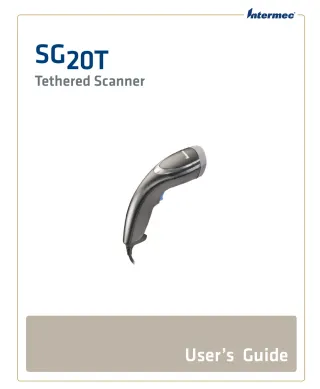
SG20T Tethered Scanner User's Guide
Manual66 pagesPDF 3.4 MB
User's guide for the Intermec SG20T tethered handheld 1D and 2D imager scanner: interfaces, configuration and specifications.
Covers · 1 model
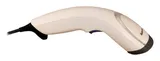
The models it covers
Summary
What is in it
The user's guide for the Intermec SG20T Tethered Scanner, a general purpose handheld scanner offered as 1D, 2D, health care and high performance imager models. It explains powering the scanner and connecting the interface cable, the lights and beeps, scanning bar codes, the USB, RS-232 and keyboard wedge interfaces, configuring with bar codes or EasySet, troubleshooting and maintenance, plus specifications and reading distances.
Its parts
- Introducing the SG20T Tethered Scanner
- Scanning with the SG20T
- SG20T Interfaces
- Configuring the SG20T Scanner
- Troubleshooting and Maintaining the SG20T
From the manual
Key facts from this manual
Each line names its page in the PDF.
Intermec SG20T Tethered Scanner User's Guide (revision B, 4/2013) for the corded SG20 models: SG20T1D, SG20T2D, SG20T2DHC, SG20THP and SG20THPHC. It covers cables and power, the lights and beeps, scanning, the USB, RS-232 and keyboard wedge interfaces, configuration bar codes and EasySet, troubleshooting and firmware upgrades, and the specifications.
- What it is
- Corded general purpose handheld scanner; models SG20T1D (1D imager), SG20T2D (2D), SG20T2DHC (health care 2D), SG20THP and SG20THPHC (high performance 2D) p. 14
- Interfaces
- USB 2.0 full speed (Keyboard HID, Virtual COM, HID POS, IBM POS Hand Held or Table Top), standard RS-232, keyboard wedge Y-cable p. 15, 30, 33
- Cables
- USB CAB-SG20-USBxxx; keyboard wedge "Y" CAB-SG20-KBWxxx; RS232 DB9 CAB-SG20-SERxxx; all 6 feet straight p. 18
- Power
- 5V, 1.7 A, through the cable from the host or an external supply; universal Intermec power supply 5V P/N 851-089-xxx (power cord sold separately) p. 15, 18, 58
- Current draw scanning
- SG20T1D: 120 mA; SG20THP and SG20THPHC: 300 to 330 mA; SG20T2D and SG20T2DHC: 340 to 370 mA (5V) p. 58
- Stands and holders
- Desktop / wall mount Holder-SG20-xx; desktop adjustable stand Stand-SG20-xx; flexible stand Flexstand-SG20-xx p. 18, 19, 20
- Serial defaults
- 57600 baud, 8 data bits, no parity, 1 stop bit; 38400 to 460800 baud selectable p. 36, 37
- Enabled symbologies
- Code 39, Code 128 / GS1-128, EAN/UPC; also PDF417 and DataMatrix on all models except SG20T1D p. 24
- SG20T1D scanning
- SG20T1D: scan angle 38°, minimum X dimension 4mils (0.1 mm); hold 15 to 25 cm (6 to 10 in) from the label p. 25, 59
- SG20THP scanning
- SG20THP, SG20THPHC: scan angles 34.4° horizontal, 22.2° vertical; minimum X 4 mils (0.1 mm) 1D, 6.6 mils (0.17 mm) 2D p. 60
- Size and weight
- Length 20 cm (7.9 in), height 6.5 cm (2.6 in), width 6.1 cm (2.4 in); 125 g (4.4 oz) p. 58
- Environment
- Operating 0°C to 50°C (32°F to 122°F); storage -20°C to 60°C; 5 to 95% humidity; shock 30 G; IP30 p. 59
- Firmware upgrade
- EasySet 5.6.5.1 or later with WinFlash and a .bin file, over RS-232 or USB Virtual Com; about 10 minutes p. 49, 50
- Configuration
- Configuration bar codes, or EasySet online (RS-232 or USB) or offline with printed setup sheets p. 40, 43, 44
What this manual walks you through
- Connecting and removing the interface cable p. 16, 17
- Reading the lights and beeps p. 22, 23, 24
- Scanning with a 1D or 2D imager p. 24, 25, 26, 27
- Setting up hands-free Autostand scanning p. 27, 41
- Setting up USB, keyboard layout and USB cable mode p. 30, 31, 32, 33, 34
- Setting RS-232 serial parameters p. 35, 36, 37
- Connecting a keyboard wedge Y-cable p. 38
- Resetting defaults, postamble and imager modes p. 40, 41, 42
- Configuring with EasySet online or offline p. 43, 44
- Troubleshooting and upgrading firmware p. 46, 47, 48, 49, 50
Good to know
- SG20THP and SG20THPHC: do not look into the window or at a reflection of the laser framing beam. p. 24
- A firmware upgrade erases the current settings and restores the defaults. p. 49
- A non-powered USB cable may not get enough power from a keyboard hub; use another hub or a powered USB cable. p. 31
- Upgrading over USB needs the USB Virtual Com cable mode. p. 50
- The RS-232 cable is powered by the external power supply; turn off the host before connecting. p. 35
Questions this manual answers
What USB cable does the SG20T use?
The 6 foot straight USB cable, part number CAB-SG20-USBxxx. p. 18
What are the SG20T default serial settings?
57600 baud, 8 data bits, no parity and 1 stop bit. p. 48
How do I set up the SG20 for hands-free scanning?
Scan the Autostand Triggering Mode configuration bar code; the desktop adjustable stand can hold the scanner at the right angle. p. 19, 41
What do six very fast beeps mean on the SG20T?
A transmission error, or a configuration bar code that was not accepted. p. 24
How do I reset the SG20T to factory defaults?
Scan the reset factory defaults configuration bar code in the guide. p. 40
Contents
Chapters and sections
Each line opens the PDF at its page.
- Document Change Record3
- Before You Begin8
- Chapter 1 - Introducing the SG20T Tethered Scanner13
- Chapter 2 - Scanning with the SG20T21
- Chapter 3 - SG20T Interfaces29
- Chapter 4 - Configuring the SG20T Scanner39
- Chapter 5 - Troubleshooting and Maintaining the SG20T45
- Appendix A - Specifications and Reading Distances57
The whole text · 8 parts
Read the manual here as text
Its text as extracted from the PDF, unedited, in parts; each page opens the PDF at that page.
- Document Change Record1-7
- Before You Begin8-12
- Chapter 1 - Introducing the SG20T Tethered Scanner13-20
- Chapter 2 - Scanning with the SG20T21-28
- Chapter 3 - SG20T Interfaces29-38
- Chapter 4 - Configuring the SG20T Scanner39-44
- Chapter 5 - Troubleshooting and Maintaining the SG20T45-56
- Appendix A - Specifications and Reading Distances57-66
The file