


Manual · Intermec
Intermec AD1 225-709-001 and AD1 225-709-002 Manual
Manual2 pagesPDF 1.6 MB
Both pages are below, each with its text.
Covers · 2 models
The models it covers
From the manual · read page by page
Key facts from this manual
Each line names its page in the PDF.
This is the Intermec quick start guide for the AD1 1-Bay Communications Dock, part number 225-709-XXX, an accessory for the CK30 and CK31 handheld computers. It explains how to set up the dock, connect serial, Ethernet or USB cables, configure Ethernet on the computer and read the lights, and gives port pinouts for making cables. It does not tell the 225-709-001 and 225-709-002 versions apart.
- Device
- 1-bay communications dock for the CK30 and CK31 handheld computers p. 1
- Functions
- Powers the CK30 or CK31, charges the battery inside it, and transfers data and applications p. 1
- Interfaces
- RS-232 serial, 10BaseT/100BaseTx Ethernet, USB Type B p. 1
- Power
- 12V, 4A from an Intermec AC power supply, 100 to 240V, 50-60 Hz p. 1
- Charge time
- Fully charges the battery in 3 hours p. 2
- Ethernet support
- CK30A model and CK31 only p. 2
- Lights
- Charge light and Power light; steady yellow Power means connected to AC power and ready p. 2
- Placement
- Flat, stable, clean surface within 1.5 m (5 ft) of an AC power outlet p. 2
- Related manuals
- CK30 Handheld Computer User's Manual (P/N 073528); CK31 Handheld Computer User's Manual (P/N 075207) p. 2
- Guide part number
- P/N 073392-007 p. 1
What this manual walks you through
- Setting up the dock and connecting power p. 2
- Connecting serial, Ethernet or USB communications cables p. 2
- Configuring Ethernet settings on a CK30A p. 2
- Configuring Ethernet settings on a CK31 p. 2
- Reading the Charge and Power lights and fixing a battery that will not charge p. 2
- Making your own serial, Ethernet or USB cable from the port pinouts p. 1
Good to know
- Do not expose the AD1 to rain or moisture. p. 1
- Use the appropriate Intermec power supply, or equipment damage may occur. p. 1
- The power supply and power cord for your location are purchased separately. p. 1
- With a USB or serial cable, no communications parameters need to be set on the CK30 or CK31. p. 2
Questions this manual answers
Which handheld computers does the Intermec AD1 dock fit?
The AD1 1-Bay Communications Dock is an accessory for the CK30 and CK31 handheld computers. p. 1
What power supply does the Intermec AD1 need?
An Intermec AC power supply giving 12V, 4A, rated 100 to 240V, 50-60 Hz, plus a power cord for your location. p. 1
How long does the AD1 take to charge a CK30 battery?
The AD1 fully charges the battery in 3 hours. p. 2
Why is the battery not charging in my AD1 dock?
Check that the battery is firmly installed, the computer is firmly in the bay, the power supply is connected to a powered outlet, and the charging pins and battery contacts are clean. p. 2
Does the AD1 Ethernet port work with the CK30?
Ethernet communications are available on the CK30A model only and on the CK31. p. 2
The file
Size and text
Every page · 2
Read it here
Each page as it is printed, and its words beside it, so a phone can search and copy them.
Page1of 2
Open in the PDF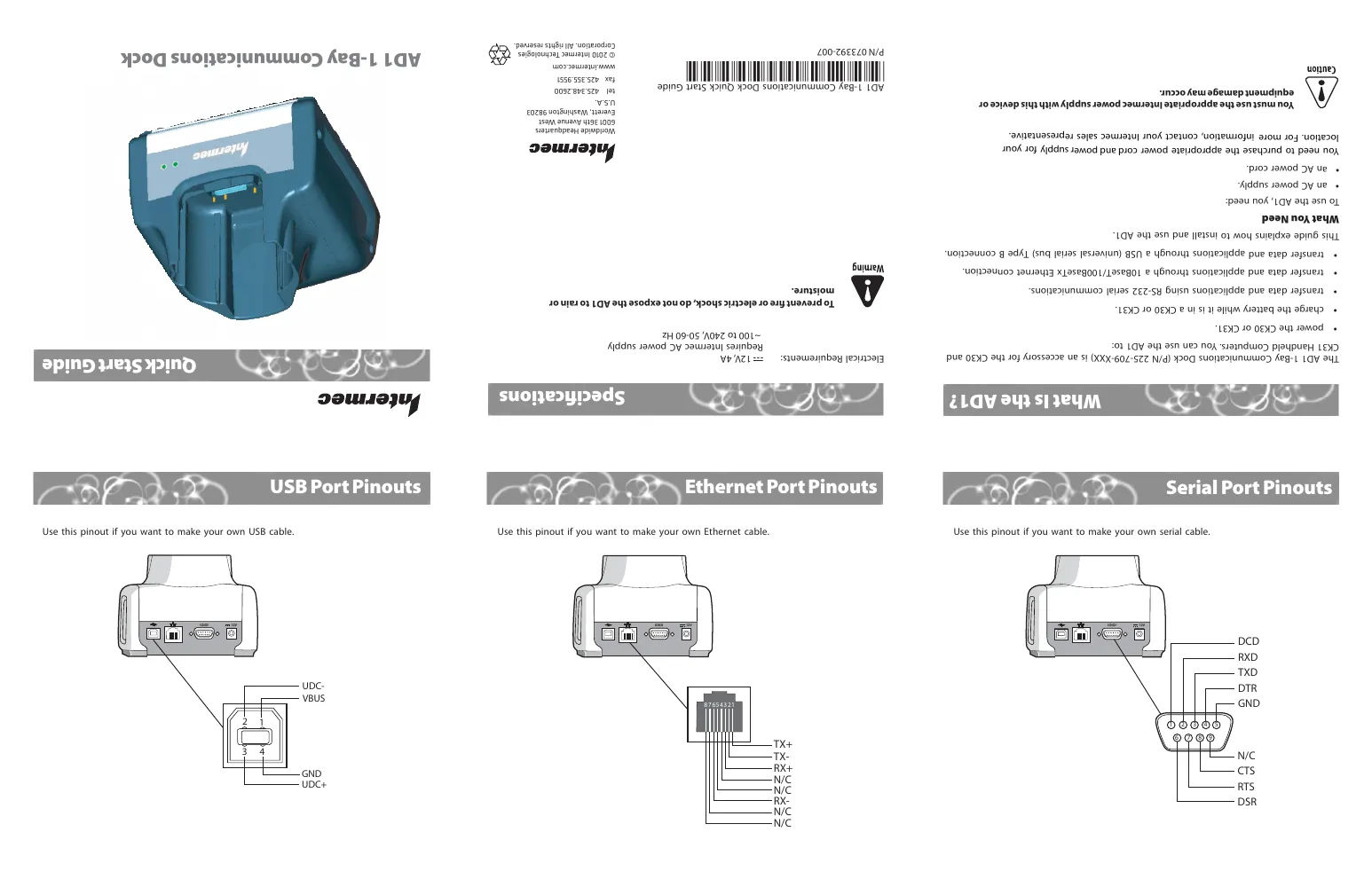
The text of page 1, from the PDF itself
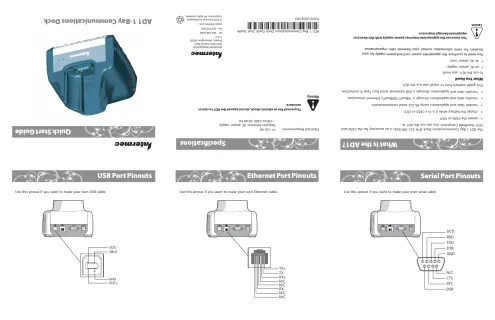
GND UDC+ 4
TX+ TXRX+ N/C N/C RXN/C N/C
6 117 28N/C CTS RTS DSR 9 435DCD RXD TXD DTR GND87 6543 21 IOIOI12V12V
Use this pinout if you want to make your own serial cable.
What Is the AD1? The AD1 1-Bay Communications Dock (P/N 225-709-XXX) is an accessory for the CK30 and CK31 Handheld Computers. You can use the AD1 to:
Specifications Electrical Requirements:
power the CK30 or CK31. charge the battery while it is in a CK30 or CK31. transfer data and applications using RS-232 serial communications.
3 2UDCVBUS IOIOI12V
Use this pinout if you want to make your own Ethernet cable.
Serial Port PinoutsEthernet Port Pinouts• • • • •IOIOI
Use this pinout if you want to make your own USB cable.
USB Port Pinouts Quick Start Guide
x 12V, 4A Requires Intermec AC power supply ~100 to 240V, 50-60 Hz
To prevent fire or electric shock, do not expose the AD1 to rain or moisture.
transfer data and applications through a 10BaseT/100BaseTx Ethernet connection. transfer data and applications through a USB (universal serial bus) Type B connection.
This guide explains how to install and use the AD1.
What You Need To use the AD1, you need:
- an AC power supply.
- an AC power cord. You need to purchase the appropriate power cord and power supply for your location. For more information, contact your Intermec sales representative.
You must use the appropriate Intermec power supply with this device or equipment damage may occur.
Heading 1
AD1 1-Bay Communications Dock Quick Start Guide
*073392-007*
Worldwide Headquarters 6001 36th Avenue West Everett, Washington 98203 U.S.A. tel 425.348.2600 fax 425.355.9551 www.intermec.com © 2010 Intermec Technologies Corporation. All rights reserved.
P/N 073392-007
AD1 1-Bay Communications Dock
Page2of 2
Open in the PDF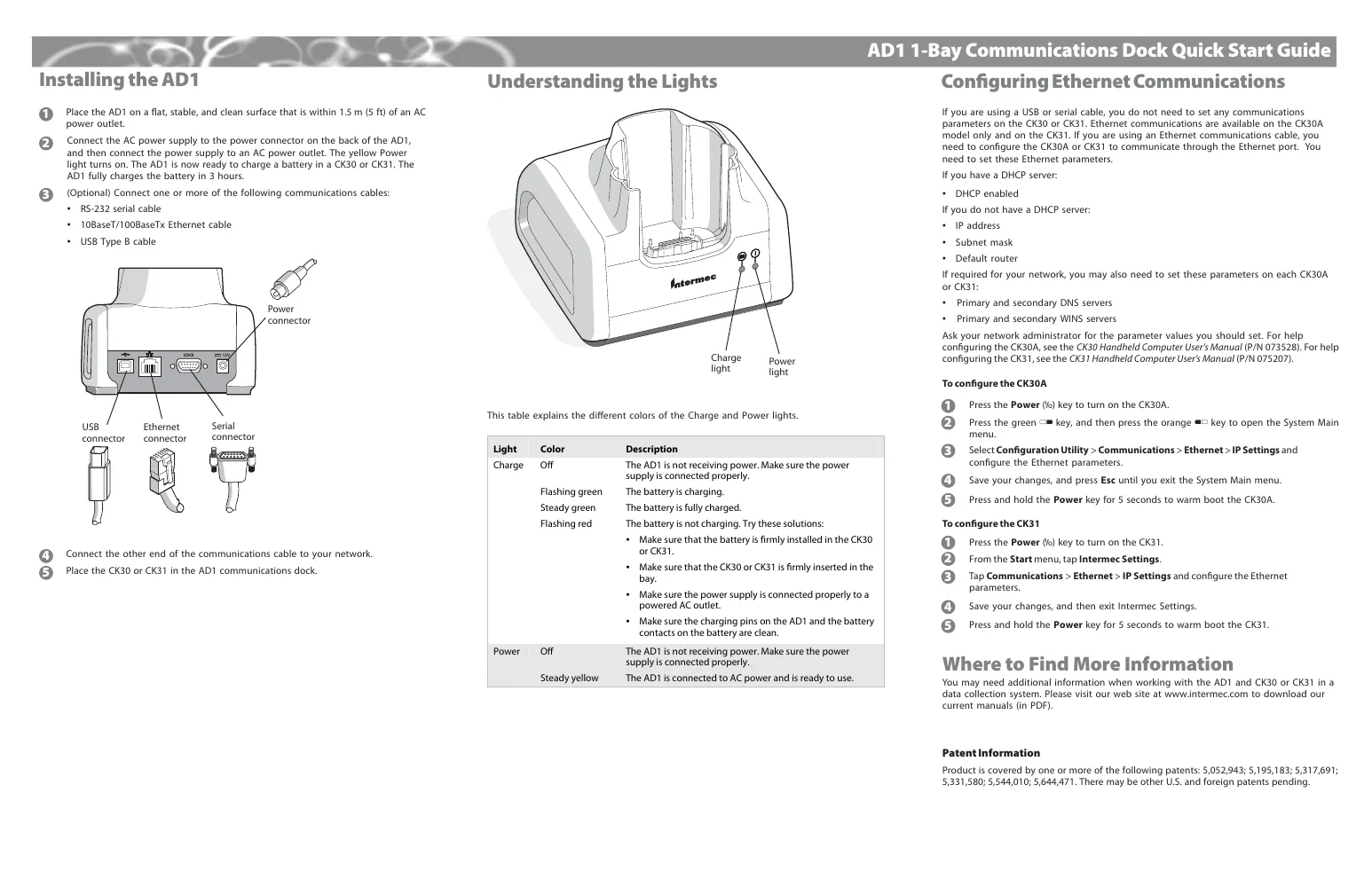
The text of page 2, from the PDF itself
AD1 1-Bay Communications Dock Quick Start Guide Installing the AD1 1
Place the AD1 on a flat, stable, and clean surface that is within 1.5 m (5 ft) of an AC power outlet.
2
Connect the AC power supply to the power connector on the back of the AD1, and then connect the power supply to an AC power outlet. The yellow Power light turns on. The AD1 is now ready to charge a battery in a CK30 or CK31. The AD1 fully charges the battery in 3 hours.
3
Configuring Ethernet Communications
Understanding the Lights
If you are using a USB or serial cable, you do not need to set any communications parameters on the CK30 or CK31. Ethernet communications are available on the CK30A model only and on the CK31. If you are using an Ethernet communications cable, you need to configure the CK30A or CK31 to communicate through the Ethernet port. You need to set these Ethernet parameters. If you have a DHCP server:
(Optional) Connect one or more of the following communications cables:
DHCP enabled
RS-232 serial cable
If you do not have a DHCP server:
10BaseT/100BaseTx Ethernet cable
USB Type B cable
IP address Subnet mask Default router
If required for your network, you may also need to set these parameters on each CK30A or CK31:
Power connectorIOIOIUSB connector4 5Ethernet connectorCharge light12VSerial connectorPower light
Primary and secondary DNS servers Primary and secondary WINS servers
Ask your network administrator for the parameter values you should set. For help configuring the CK30A, see the CK30 Handheld Computer User’s Manual (P/N 073528). For help configuring the CK31, see the CK31 Handheld Computer User’s Manual (P/N 075207). To configure the CK30A
This table explains the different colors of the Charge and Power lights.
1 2LightColorDescription3ChargeOff
The AD1 is not receiving power. Make sure the power supply is connected properly.
Select Configuration Utility > Communications > Ethernet > IP Settings and configure the Ethernet parameters.
The battery is charging.
Steady green
The battery is fully charged.
4 5
Save your changes, and press Esc until you exit the System Main menu.
Flashing green Flashing red
The battery is not charging. Try these solutions:
To configure the CK31
- Make sure that the battery is firmly installed in the CK30 or CK31.
1 2 3
Press the Power (I) key to turn on the CK31.
4 5
Save your changes, and then exit Intermec Settings.
Connect the other end of the communications cable to your network.
- Make sure that the CK30 or CK31 is firmly inserted in the bay.
Place the CK30 or CK31 in the AD1 communications dock.
- Make sure the power supply is connected properly to a powered AC outlet.
- Make sure the charging pins on the AD1 and the battery contacts on the battery are clean. Power
Off
The AD1 is not receiving power. Make sure the power supply is connected properly.
Steady yellow
The AD1 is connected to AC power and is ready to use.
Press the Power (I) key to turn on the CK30A. Press the green C key, and then press the orange B key to open the System Main menu.
Press and hold the Power key for 5 seconds to warm boot the CK30A.
From the Start menu, tap Intermec Settings. Tap Communications > Ethernet > IP Settings and configure the Ethernet parameters.
Press and hold the Power key for 5 seconds to warm boot the CK31.
Where to Find More Information You may need additional information when working with the AD1 and CK30 or CK31 in a data collection system. Please visit our web site at www.intermec.com to download our current manuals (in PDF).
Patent Information Product is covered by one or more of the following patents: 5,052,943; 5,195,183; 5,317,691; 5,331,580; 5,544,010; 5,644,471. There may be other U.S. and foreign patents pending.