Manual · Intermec
680x Series Portable Printers Technical Reference Manual
Manual146 pagesPDF 15 MB
Technical reference manual for the Intermec 680x series portable printers, including the 6805a and 6806: paper, batteries, commands and troubleshooting.
Covers · 2 models
The models it covers
Summary
What is in it
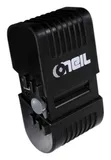
The technical reference manual for Intermec's 680x series portable printers. It shows the key parts and parts list of each model (6805a, 6806, 6804T, 6804DM, 6808, 681, 682, 781 and 782), then covers the self test, wireless printing on the 781T, paper loading, batteries and charging, line printer and Easy Print modes with their escape sequences and commands, card reader commands, cleaning and troubleshooting. Appendices give specifications, query commands and available fonts.
Its parts
- General Information
- Self Test
- 781T Printer using Wireless Printing
- Operation
- Maintenance and Troubleshooting
From the manual
Key facts from this manual
Each line names its page in the PDF.
Technical reference manual for the Intermec 680x series of portable thermal receipt and label printers. It covers the 6805a, 6806, 6804T, 6804T CR, 6804DM, 6804DM CR, 6808, 6808 CR, 681, 682, 781 and 782. It lets the reader load paper, charge and replace batteries, run a self test, troubleshoot printing and downloading, and look up specifications and part numbers.
- Print method
- Direct thermal, on thermal paper or linerless labels p. 103
- Interfaces
- RS-232C, infrared, IrDA and ASK; RJ-11 six-position modular jack p. 103, 110
- 6805a battery
- 6805a: internal NiCd pack, 850 mAhr, 5 x AA cells, 6.0 V; replacement 320-066-041 p. 13, 103, 109
- Print width
- 6805a: 1.85 in. (47 mm), 384 dots, on 2.26 in. paper; 6806: 2.83 in. (72 mm), 576 dots, on 3.15 in. paper p. 103
- Print speed
- 2 in. per second p. 103
- Size and weight
- 6805a: 3.75 x 6.25 x 2.25 in., 23 oz.; 6806: 4 x 7 x 2.1 in., 36 oz. p. 103
- Operating temperature
- +5 to +122 F (-15 to +50 C) p. 103
- Print per charge
- 6805a: more than 2,800 in.; 6806: more than 13,000 in. p. 103
- Flash memory
- 4 Meg p. 103
- Printer part numbers
- 6805a 320-066-004 (linerless 320-066-006); 6806 320-070-004 (linerless 320-070-006) p. 13, 15
- Cables
- 60x to 680x serial cable (RJ-11) 226-437-001; laptop download cable 320-066-032; 4000 Series and 6210 226-044-001; 6300 216-996-001; RT1700 216-994-001 p. 13, 15
- Power adapters
- AC adapter (110 Volt) 320-066-042; U.K. 320-066-043; Europe 320-066-044; Australia 320-066-045; cigarette lighter adapter 320-066-031 p. 13
- Paper supplies
- 6805a paper 320-066-021, linerless 320-066-022; 6806 paper 320-070-021, linerless 320-070-022; cleaning paper (25) 320-066-013 p. 13, 15
What this manual walks you through
- Printing and reading a self test p. 39, 40
- Checking the battery charge p. 54, 55
- Charging with the AC or cigarette lighter adapter p. 56, 57
- Replacing the fuse in the cigarette lighter adapter p. 57, 58
- Threading a paper roll p. 54
- Troubleshooting a printer that will not print p. 99
- Fixing light print with the darkness setting p. 99, 100
- Correcting Easy Print command format errors p. 101, 102
- Solving configuration download problems p. 102
Good to know
- Configuration downloads work over a cable only, not over infrared. p. 102
- Updating the firmware deletes any data stored in the printer's internal memory. p. 100
- Use only the batteries specified for the printer. p. 55
- Many vehicles cut power to the cigarette lighter when the engine is off, which stops charging. p. 58
- If a new roll does not feed, remove two to three feet of paper from the outside of the roll. p. 98
Questions this manual answers
How do I print a self test on a 6805a or 6806?
Press and hold the red self test button for four seconds. The printout shows the firmware version, settings and battery voltage. p. 39, 40
How long does the 6806 take to recharge?
About four hours. The printer can be used while it charges. p. 55, 57
What fuse does the cigarette lighter adapter take?
A 5A 250V fuse, 1/4 in. diameter and 1 1/4 in. long, UL and CSA approved. p. 58
What is the pinout of the 680x printer cable jack?
The RJ-11 jack carries 1 VBATT, 2 TXD, 3 RXD, 4 DTR, 5 Ground and 6 VCC. p. 110
Contents
Chapters and sections
Each line opens the PDF at its page.
- Title1
- Section 1: General Information11
- Introduction11
- 680x Portable Printer Descriptions11
- The 6805a Portable Printer12
- The 6806 Portable Printer14
- The 6804T Portable Printer16
- The 6804T CR Portable Printer18
- The 6804DM Portable Printer20
- The 6804DM CR Portable Printer22
- The 6808 Portable Printer24
- The 6808 CR Portable Printer26
- The 681 Portable Printer28
- The 682 Portable Printer30
- The 781 Portable Printer32
- The 782 Portable Printer34
- Features and Benefits36
- Section 2: Self Test39
- Section 3: 781T Printer using Wireless Printing41
- Section 4: Operation49
- Paper Loading49
- Batteries54
- Charging your Printer with the AC Adapter56
- Charging your Printer with the Cigarette Lighter Adapter57
- Replacing the Fuse57
- When to Replace the Battery58
- Replacing the Battery58
- Customer Receipts and Labels60
- Easy Print Mode70
- Print Command Format72
- Easy Print Command Section75
- Ahead Command Format {AHEAD: nnn}76
- Back Command Format {BACK: nnn}76
- Line Printer Mode {LP}76
- Self Test Printout {TP}76
- Print Command Format77
The whole text · 16 parts
Read the manual here as text
Its text as extracted from the PDF, unedited, in parts; each page opens the PDF at that page.
- Pages 1 to 101-10
- Section 1: General Information, pages 11 to 2011-20
- Section 1: General Information, pages 21 to 3021-30
- Section 1: General Information, pages 31 to 3831-38
- Pages 39 to 4839-48
- Section 4: Operation, pages 49 to 5849-58
- Section 4: Operation, pages 59 to 6859-68
- Section 4: Operation, pages 69 to 7869-78
- Section 4: Operation, pages 79 to 8879-88
- Section 4: Operation, pages 89 to 9689-96
- Section 5: Maintenance and Troubleshooting97-102
- Appendix A: Specifications, pages 103 to 110103-110
- Appendix A: Specifications, pages 111 to 118111-118
- Appendix B: Query119-132
- Pages 133 to 140133-140
- Index141-146
The file