


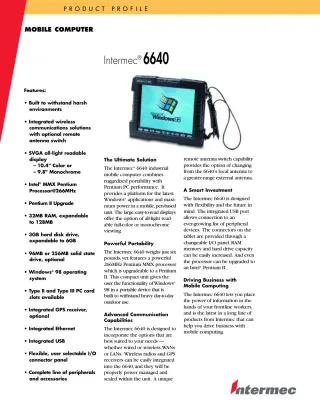
Spec sheet · Intermec
Intermec 6640 Spec Sheet
Spec sheet4 pagesPDF 212 KB
All 4 pages are below, each with its text.
Covers · 1 model
The models it covers
From the sheet · read page by page
Key facts from this sheet
Each line names its page in the PDF.
Intermec product profile and specification sheet for the 6640, a rugged pen-based mobile computer running Windows 98. It describes the processor, memory, storage, displays, battery, I/O panels, wireless and GPS options, the vehicle and in-premise docks and the auxiliary I/O port, with a full specification table.
- What it is
- Rugged, pen-based industrial mobile computer running Windows 98 p. 1, 4
- Processor
- Pentium MMX@266MHz, upgradeable to Pentium II@333MHz p. 4
- Memory
- 32MB RAM standard, upgradeable to 64MB/128MB p. 4
- Storage
- 3GB hard disk standard, upgradeable to 6GB or larger; optional 96MB or 256MB solid state drive p. 4
- Display
- 800 x 600; monochrome 9.8" SVGA or color 10.4" SVGA, all light readable p. 4
- Size and weight
- Length 24.1cm (9.5"), width 30.5cm (12.0"), depth 5.3cm (2.1"); 2.7kg (6.0lbs) with battery p. 4
- Battery
- Intelligent LiION battery with fuel gauge, hot-swappable during suspend mode p. 4
- Operating temperature
- -20° to 50° C (-4° to 122° F); storage -30° to 70° C (-22° to 158° F) p. 4
- Touch input
- Capacitive touch panel with tethered pen; a finger also works but the pen overrides it p. 2
- I/O panels
- Panel 1: PS/2, RJ45 & DB9; Panel 2: RJ11, RJ45 & DB9; Panel 3: DB25 & audio headset; plus a dedicated USB connector p. 2
- PC card slots
- 1 Type II and 1 Type III; radios are integrated serial modules and do not use the slots p. 4
- Wireless options
- WAN radio modules for Mobitex, CDPD or GSM; 2.4GHz LAN radio; optional integrated GPS; optional remote antenna switch p. 1, 2
- Aux I/O port
- 15-pin, four general purpose digital outputs and four digital inputs p. 3
- Docks
- Basic or full feature vehicle and in-premise docks; port replicator (compact, I/O port, power input) p. 4
What this sheet walks you through
- Choosing an I/O connector panel p. 2
- Adding WAN, LAN and GPS radios p. 2
- How the dock connects to the computer p. 2, 3
- Switching to a remote vehicle antenna p. 3
- Using the auxiliary I/O port to control and monitor external circuits p. 3
Good to know
- Vehicle pedestal mounts come from third party vendors; Intermec offers adapter plates to fit its docks to them. p. 3
- Approvals, features and specifications can vary by country and by the configuration chosen. p. 4
- The pen is the preferred way to use the touch panel; it always overrides a finger. p. 2
Questions this sheet answers
What processor does the Intermec 6640 have?
A Pentium MMX at 266MHz, upgradeable to a Pentium II at 333MHz. p. 4
How much does the Intermec 6640 weigh?
2.7kg (6.0lbs) with the battery. p. 4
What operating system does the 6640 run?
Windows 98. p. 4
What ports does the 6640 have?
A dedicated USB connector plus an I/O panel with up to 3 connectors, chosen from parallel DB-25, serial DB-9, Ethernet RJ-45, modem RJ-11, audio headset and PS/2 keyboard. p. 4
Can the 6640 battery be changed without shutting down?
The LiION battery is hot-swappable during suspend mode. p. 4
The file
Size and text
Every page · 4
Read it here
Each page as it is printed, and its words beside it, so a phone can search and copy them.
Page1of 4
Open in the PDF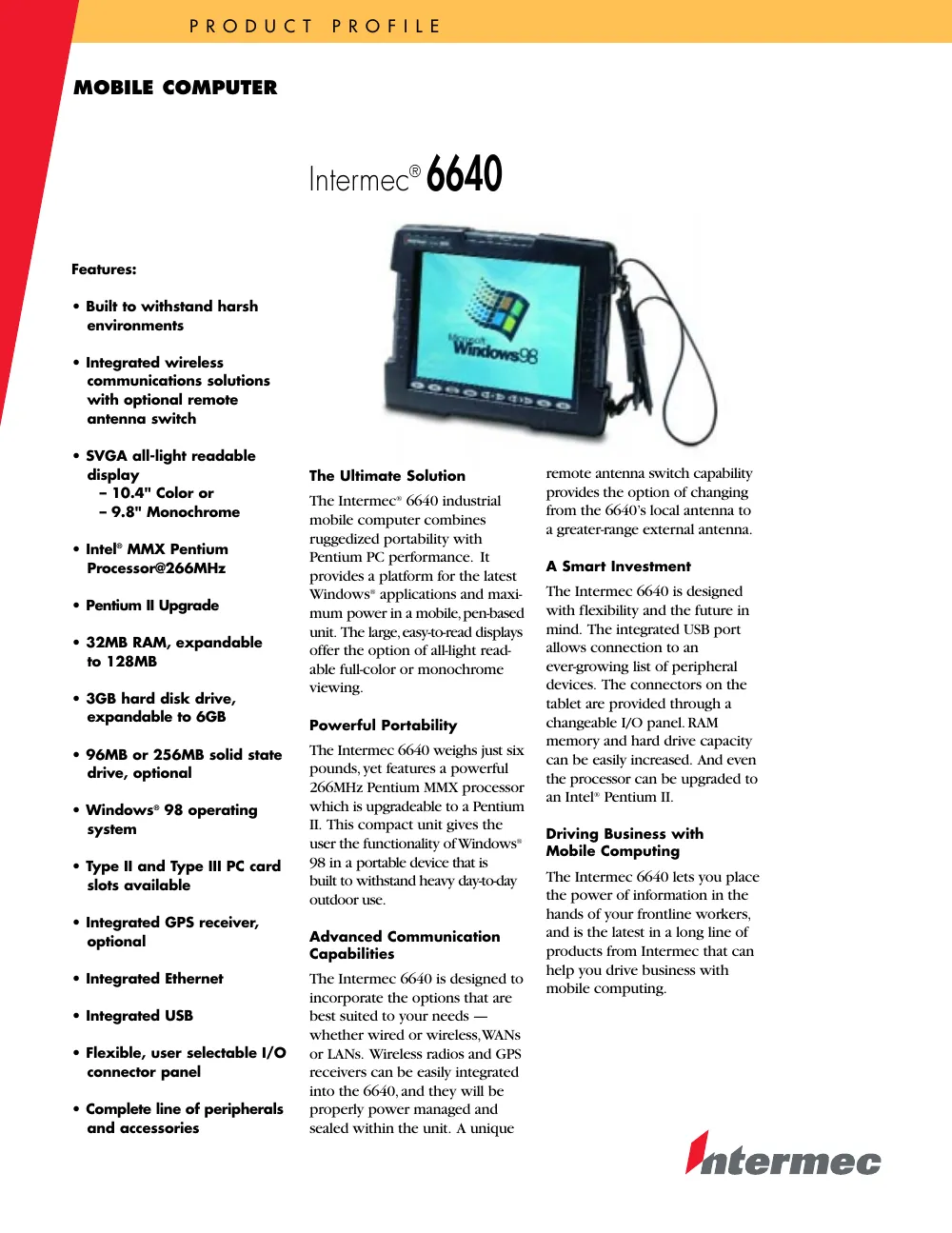
The text of page 1, from the PDF itself
P R O D U C TP R O F I L EMOBILE COMPUTER
Intermec® 6640 Features:
- Built to withstand harsh environments
- Integrated wireless communications solutions with optional remote antenna switch
- SVGA all-light readable display – 10.4" Color or – 9.8" Monochrome
- Intel® MMX Pentium Processor@266MHz
- Pentium II Upgrade
- 32MB RAM, expandable to 128MB
- 3GB hard disk drive, expandable to 6GB
- 96MB or 256MB solid state drive, optional
- Windows® 98 operating system
- Type II and Type III PC card slots available
- Integrated GPS receiver, optional
- Integrated Ethernet
- Integrated USB
- Flexible, user selectable I/O connector panel
- Complete line of peripherals and accessories
The Ultimate Solution
The Intermec® 6640 industrial mobile computer combines ruggedized portability with Pentium PC performance. It provides a platform for the latest Windows® applications and maximum power in a mobile,pen-based unit. The large,easy-to-read displays offer the option of all-light readable full-color or monochrome viewing. Powerful Portability
The Intermec 6640 weighs just six pounds, yet features a powerful 266MHz Pentium MMX processor which is upgradeable to a Pentium II. This compact unit gives the user the functionality of Windows® 98 in a portable device that is built to withstand heavy day-to-day outdoor use. Advanced Communication Capabilities
The Intermec 6640 is designed to incorporate the options that are best suited to your needs, whether wired or wireless,WANs or LANs. Wireless radios and GPS receivers can be easily integrated into the 6640, and they will be properly power managed and sealed within the unit. A unique
remote antenna switch capability provides the option of changing from the 6640’s local antenna to a greater-range external antenna. A Smart Investment
The Intermec 6640 is designed with flexibility and the future in mind. The integrated USB port allows connection to an ever-growing list of peripheral devices. The connectors on the tablet are provided through a changeable I/O panel. RAM memory and hard drive capacity can be easily increased. And even the processor can be upgraded to an Intel® Pentium II. Driving Business with Mobile Computing
The Intermec 6640 lets you place the power of information in the hands of your frontline workers, and is the latest in a long line of products from Intermec that can help you drive business with mobile computing.
Page2of 4
Open in the PDF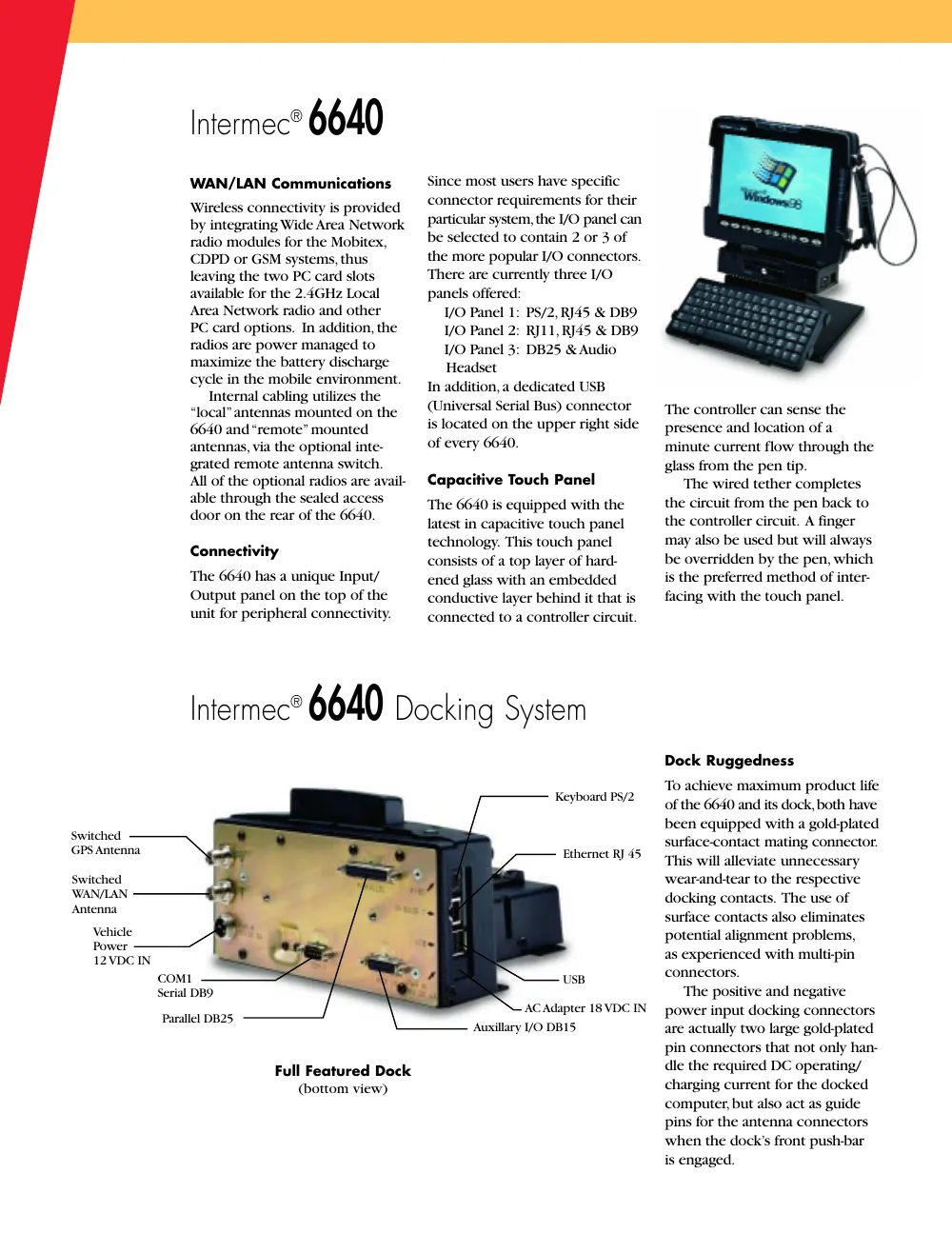
The text of page 2, from the PDF itself
Intermec® 6640 WAN/LAN Communications
Wireless connectivity is provided by integrating Wide Area Network radio modules for the Mobitex, CDPD or GSM systems, thus leaving the two PC card slots available for the 2.4GHz Local Area Network radio and other PC card options. In addition, the radios are power managed to maximize the battery discharge cycle in the mobile environment. Internal cabling utilizes the “local” antennas mounted on the 6640 and “remote” mounted antennas, via the optional integrated remote antenna switch. All of the optional radios are available through the sealed access door on the rear of the 6640. Connectivity
The 6640 has a unique Input/ Output panel on the top of the unit for peripheral connectivity.
Since most users have specific connector requirements for their particular system,the I/O panel can be selected to contain 2 or 3 of the more popular I/O connectors. There are currently three I/O panels offered: I/O Panel 1: PS/2, RJ45 & DB9 I/O Panel 2: RJ11, RJ45 & DB9 I/O Panel 3: DB25 & Audio Headset In addition, a dedicated USB (Universal Serial Bus) connector is located on the upper right side of every 6640. Capacitive Touch Panel
The 6640 is equipped with the latest in capacitive touch panel technology. This touch panel consists of a top layer of hardened glass with an embedded conductive layer behind it that is connected to a controller circuit.
The controller can sense the presence and location of a minute current flow through the glass from the pen tip. The wired tether completes the circuit from the pen back to the controller circuit. A finger may also be used but will always be overridden by the pen, which is the preferred method of interfacing with the touch panel.
Intermec® 6640 Docking System Dock Ruggedness Keyboard PS/2 Switched GPS Antenna
Ethernet RJ 45
Switched WAN/LAN Antenna Vehicle Power 12 VDC IN COM1 Serial DB9
USB AC Adapter 18 VDC IN Auxillary I/O DB15
Parallel DB25
Full Featured Dock (bottom view)
To achieve maximum product life of the 6640 and its dock,both have been equipped with a gold-plated surface-contact mating connector. This will alleviate unnecessary wear-and-tear to the respective docking contacts. The use of surface contacts also eliminates potential alignment problems, as experienced with multi-pin connectors. The positive and negative power input docking connectors are actually two large gold-plated pin connectors that not only handle the required DC operating/ charging current for the docked computer, but also act as guide pins for the antenna connectors when the dock’s front push-bar is engaged.
Page3of 4
Open in the PDF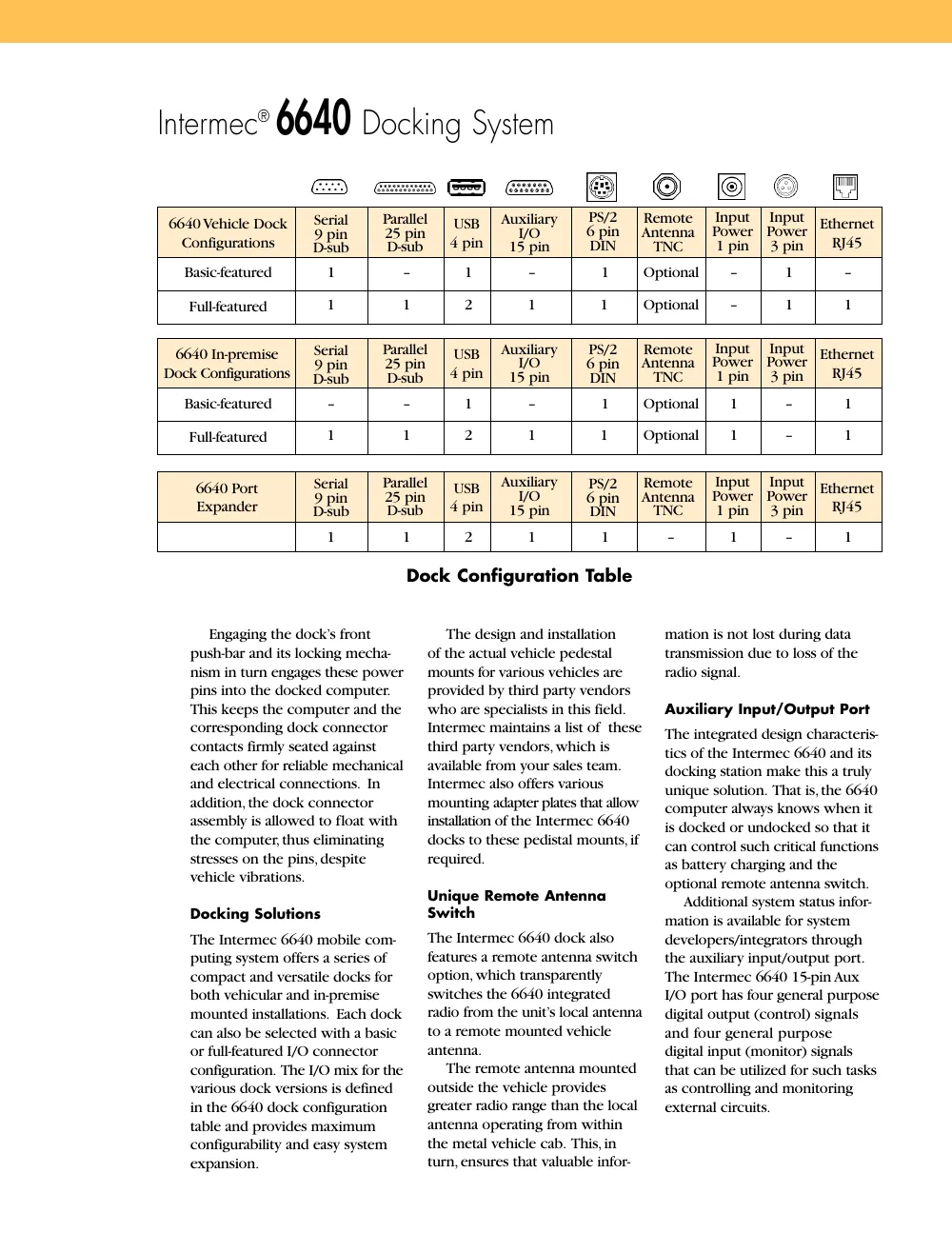
The text of page 3, from the PDF itself
Intermec® 6640 Docking System Input Input Power Power Ethernet RJ45 1 pin 3 pin
6640 Vehicle Dock Configurations
Serial 9 pin D-subParallel 25 pin D-subUSB 4 pinAuxiliary I/O 15 pinPS/2 6 pin DINRemote Antenna TNCBasic-featured1–1–1Optional–1–Full-featured11211Optional–11
6640 In-premise Dock Configurations
Serial 9 pin D-subParallel 25 pin D-subUSB 4 pinAuxiliary I/O 15 pinPS/2 6 pin DINRemote Antenna TNCBasic-featured––1–1Optional1–1Full-featured11211Optional1–16640 Port ExpanderSerial 9 pin D-subParallel 25 pin D-subUSB 4 pinAuxiliary I/O 15 pinPS/2 6 pin DINRemote Antenna TNC11211–
Input Input Power Power Ethernet RJ45 1 pin 3 pin
Input Input Power Power Ethernet RJ45 1 pin 3 pin 1
–
1
Dock Configuration Table Engaging the dock’s front push-bar and its locking mechanism in turn engages these power pins into the docked computer. This keeps the computer and the corresponding dock connector contacts firmly seated against each other for reliable mechanical and electrical connections. In addition, the dock connector assembly is allowed to float with the computer, thus eliminating stresses on the pins, despite vehicle vibrations.
The design and installation of the actual vehicle pedestal mounts for various vehicles are provided by third party vendors who are specialists in this field. Intermec maintains a list of these third party vendors, which is available from your sales team. Intermec also offers various mounting adapter plates that allow installation of the Intermec 6640 docks to these pedistal mounts, if required.
Docking Solutions
Unique Remote Antenna Switch
The Intermec 6640 mobile computing system offers a series of compact and versatile docks for both vehicular and in-premise mounted installations. Each dock can also be selected with a basic or full-featured I/O connector configuration. The I/O mix for the various dock versions is defined in the 6640 dock configuration table and provides maximum configurability and easy system expansion.
The Intermec 6640 dock also features a remote antenna switch option, which transparently switches the 6640 integrated radio from the unit’s local antenna to a remote mounted vehicle antenna. The remote antenna mounted outside the vehicle provides greater radio range than the local antenna operating from within the metal vehicle cab. This, in turn, ensures that valuable infor-
mation is not lost during data transmission due to loss of the radio signal. Auxiliary Input/Output Port
The integrated design characteristics of the Intermec 6640 and its docking station make this a truly unique solution. That is, the 6640 computer always knows when it is docked or undocked so that it can control such critical functions as battery charging and the optional remote antenna switch. Additional system status information is available for system developers/integrators through the auxiliary input/output port. The Intermec 6640 15-pin Aux I/O port has four general purpose digital output (control) signals and four general purpose digital input (monitor) signals that can be utilized for such tasks as controlling and monitoring external circuits.
Page4of 4
Open in the PDF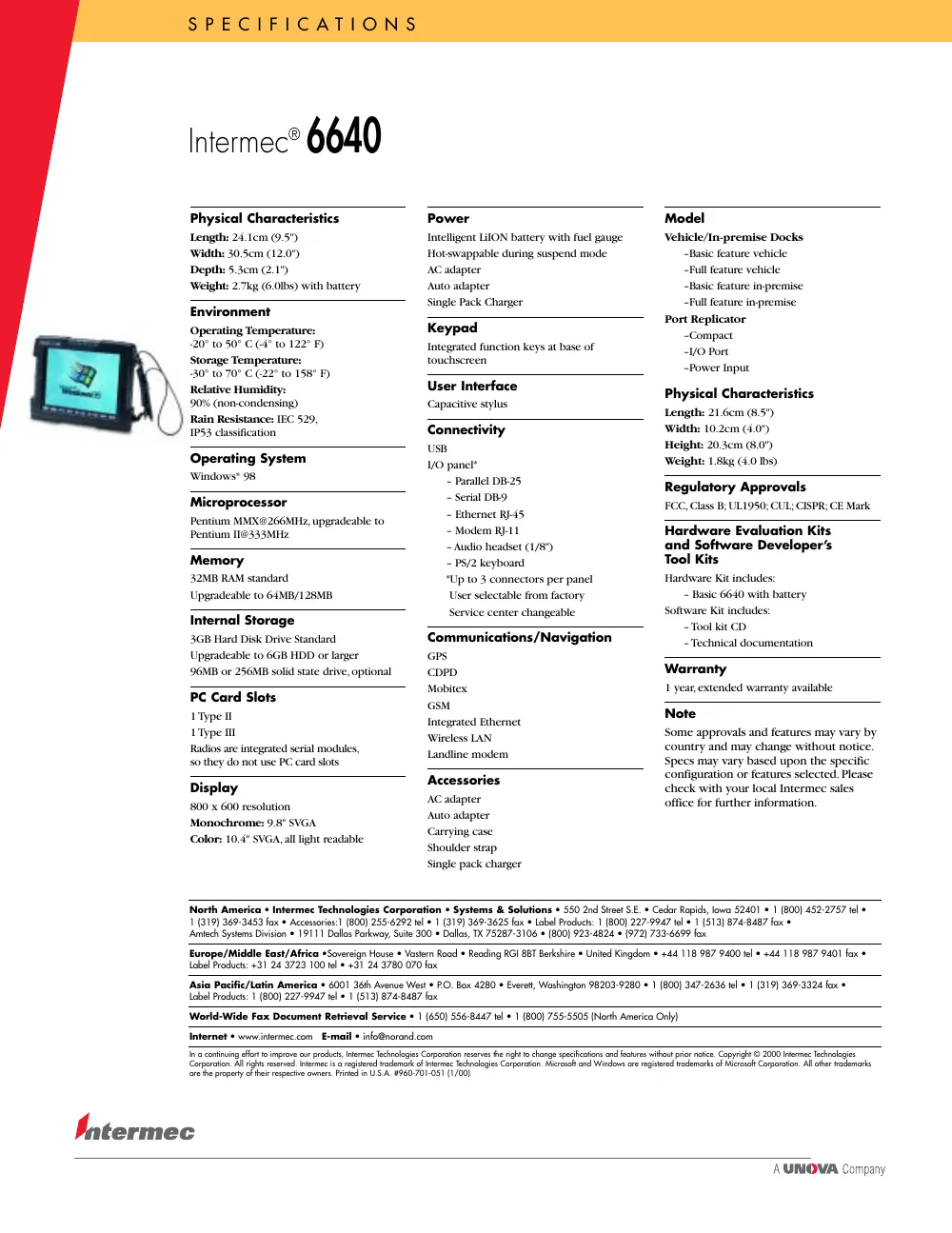
The text of page 4, from the PDF itself
S P E C I F I C AT I O N S
Intermec® 6640 Physical Characteristics
Power
Model
Length: 24.1cm (9.5") Width: 30.5cm (12.0") Depth: 5.3cm (2.1") Weight: 2.7kg (6.0lbs) with battery
Intelligent LiION battery with fuel gauge Hot-swappable during suspend mode AC adapter Auto adapter Single Pack Charger
Vehicle/In-premise Docks –Basic feature vehicle –Full feature vehicle –Basic feature in-premise –Full feature in-premise Port Replicator –Compact –I/O Port –Power Input
Environment Operating Temperature: -20° to 50° C (-4° to 122° F) Storage Temperature: -30° to 70° C (-22° to 158° F) Relative Humidity: 90% (non-condensing) Rain Resistance: IEC 529, IP53 classification
Operating System Windows® 98
Microprocessor Pentium MMX@266MHz, upgradeable to Pentium II@333MHz
Memory 32MB RAM standard Upgradeable to 64MB/128MB
Internal Storage 3GB Hard Disk Drive Standard Upgradeable to 6GB HDD or larger 96MB or 256MB solid state drive, optional
PC Card Slots 1 Type II 1 Type III Radios are integrated serial modules, so they do not use PC card slots
Display 800 x 600 resolution Monochrome: 9.8" SVGA Color: 10.4" SVGA, all light readable
Keypad Integrated function keys at base of touchscreen
User Interface Capacitive stylus
Connectivity USB I/O panel* – Parallel DB-25 – Serial DB-9 – Ethernet RJ-45 – Modem RJ-11 – Audio headset (1/8") – PS/2 keyboard *Up to 3 connectors per panel User selectable from factory Service center changeable
Communications/Navigation GPS CDPD Mobitex GSM Integrated Ethernet Wireless LAN Landline modem
Accessories AC adapter Auto adapter Carrying case Shoulder strap Single pack charger
Physical Characteristics Length: 21.6cm (8.5") Width: 10.2cm (4.0") Height: 20.3cm (8.0") Weight: 1.8kg (4.0 lbs)
Regulatory Approvals FCC, Class B; UL1950; CUL; CISPR; CE Mark
Hardware Evaluation Kits and Software Developer’s Tool Kits Hardware Kit includes: – Basic 6640 with battery Software Kit includes: – Tool kit CD – Technical documentation
Warranty 1 year, extended warranty available
Note Some approvals and features may vary by country and may change without notice. Specs may vary based upon the specific configuration or features selected. Please check with your local Intermec sales office for further information.
North America • Intermec Technologies Corporation • Systems & Solutions • 550 2nd Street S.E. • Cedar Rapids, Iowa 52401 • 1 (800) 452-2757 tel • 1 (319) 369-3453 fax • Accessories:1 (800) 255-6292 tel • 1 (319) 369-3625 fax • Label Products: 1 (800) 227-9947 tel • 1 (513) 874-8487 fax • Amtech Systems Division • 19111 Dallas Parkway, Suite 300 • Dallas, TX 75287-3106 • (800) 923-4824 • (972) 733-6699 fax Europe/Middle East/Africa •Sovereign House • Vastern Road • Reading RGI 8BT Berkshire • United Kingdom • +44 118 987 9400 tel • +44 118 987 9401 fax • Label Products: +31 24 3723 100 tel • +31 24 3780 070 fax Asia Pacific/Latin America • 6001 36th Avenue West • P.O. Box 4280 • Everett, Washington 98203-9280 • 1 (800) 347-2636 tel • 1 (319) 369-3324 fax • Label Products: 1 (800) 227-9947 tel • 1 (513) 874-8487 fax World-Wide Fax Document Retrieval Service • 1 (650) 556-8447 tel • 1 (800) 755-5505 (North America Only) Internet • www.intermec.com E-mail • info@norand.com In a continuing effort to improve our products, Intermec Technologies Corporation reserves the right to change specifications and features without prior notice. Copyright © 2000 Intermec Technologies Corporation. All rights reserved. Intermec is a registered trademark of Intermec Technologies Corporation. Microsoft and Windows are registered trademarks of Microsoft Corporation. All other trademarks are the property of their respective owners. Printed in U.S.A. #960-701-051 (1/00)