Manual · Intermec
4500 Hand-Held Computer User's Guide
Manual46 pagesPDF 620 KB
User's guide for the Intermec 4500 hand-held computer, a rugged battery-powered unit for route sales and distribution work.
Covers · 1 model
The models it covers
Summary
What is in it
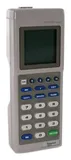
Intermec's user's guide for the 4500 hand-held computer, a rugged battery-operated unit for route distribution and similar field work. It describes the unit's memory, processor, display, keyboard and endcap options (including the 4805 endcap printer), then covers battery installation and charging, power-up, display contrast, memory protection and the optional memory card, connections and routine operation, troubleshooting, maintenance and connector pin-outs.
Its parts
- Section 1: Introduction
- Section 2: Operation
- Section 3: Troubleshooting
- Section 4: Maintenance
- Section 5: Specifications
From the manual · read page by page
Key facts from this manual
Each line names its page in the PDF.
Intermec user's guide, PN 961-028-069 Revision B, for the 4500 hand-held computer, a rugged battery-operated unit for route distribution work. It explains the keyboards, display and endcap connectors, then walks through installing and charging batteries, first power-up, memory cards, troubleshooting and maintenance. It ends with specifications and the pin-outs of the 15-pin and 9-pin connectors.
- Device type
- Rugged, battery-operated hand-held computer for route distribution work p. 9
- Processor
- NEC V25+ 10 MHz p. 44
- Memory
- 1, 2, 3, or 4 megabytes PSRAM; BIOS firmware in 512K byte OTP ROM p. 44
- Display
- 16-line black on white LCD with graphics, adjustable contrast and keyboard-controlled backlight p. 11
- Keyboard
- 23-key numeric or 40-key alphanumeric p. 14
- Connectors
- Endcap with a 15-pin RS-232 connector, optional 9-pin scanner connector and RJ-11 phone jack (internal modem); surface contacts at the battery end p. 13, 14, 31
- Communication
- RS-232 and RS-485; proprietary protocol, X modem/Y modem p. 43
- Power
- AA size alkaline cells (standard) or NiCd battery pack (optional); backup capacitor and lithium battery p. 43
- Charging
- Full NiCd charge takes 11 hours in a 4960 MultiDock, 4950 Single Dock, 4810, 4815 or 4820 printer, or many modems p. 23
- NiCd pack life
- About 500 charges p. 33
- Size
- 8.75 inches long, 3.31 inches wide, 1.90 inches high p. 43
- Memory card battery
- Part number 317-065-001; replace about every two years p. 40
- Endcap printer
- 4805 40-column endcap printer; its manual is part number 961-019-003 p. 18
- Error codes
- Listed in the Error Codes Reference Guide, part number 979-000-001 p. 35
What this manual walks you through
- Installing the NiCd pack or AA alkaline cells p. 19, 21, 22
- Activating the backup battery by removing the shipping insulator p. 24, 25
- Powering up for the first time and enabling the BIOS p. 25, 26
- Adjusting display contrast p. 27
- Installing an optional memory card p. 29, 30
- Fitting a peripheral endcap p. 31
- Clearing Low Battery, Printer Not Ready and Bad TCOM messages p. 35
- Replacing the hand strap p. 38, 39
- Replacing the memory card battery p. 40
- Cleaning the case p. 41
Good to know
- After LOW BATTERY first shows, the main pack keeps memory for up to 30 days; the internal capacitor holds it for only 5 minutes. p. 29
- Backup battery replacement needs major disassembly and is done only by authorized service center personnel. p. 38
- Data on the memory card is lost when its battery is replaced and must be restored. p. 40
- The manual warns that the lithium battery may explode if replaced incorrectly; replace it only with the same or equivalent type. p. 4
- Before storing the unit for more than 10 days, upload all data and fit a fully charged NiCd pack or fresh alkaline cells. p. 34
Questions this manual answers
What batteries does the 4500 hand-held computer use?
Either individual AA size alkaline cells or the special NiCd battery pack, with a capacitor and a lithium battery as backup. p. 19, 43
How long does the 4500 NiCd battery take to charge?
A complete charge takes 11 hours in a charging device such as the 4960 MultiDock, 4950 Single Dock or a 4810, 4815 or 4820 printer. p. 23
How much memory does the 4500 have?
1, 2, 3, or 4 megabytes of RAM for data storage and application software. p. 11
What does Bad TCOM mean on the 4500?
The trouble chart says to review and retry the communications procedures. p. 35
What scanner connector does the 4500 have?
The peripheral endcap can have a 9-pin scanner interface connector, which needs the optional scanner board. p. 13
The whole text · 5 parts
Read the manual here as text
Its text as extracted from the PDF, unedited, in parts; each page opens the PDF at that page.
The file