Manual · Intermec
SF51 4-Bay Charger Instructions
Manual16 pagesPDF 1.1 MB
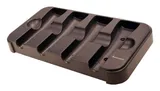
Instructions in English, German and Spanish for the Intermec SF51 4-Bay Charger (Model 074646) for the SF51 cordless scanner.
Covers · 1 model
The models it covers
Summary
What is in it
Intermec's instruction sheet, in English, German and Spanish, for the SF51 4-Bay Charger (Model 074646), an accessory for the SF51 Cordless Scanner. It lists the separately sold power supply and cord, explains horizontal and vertical mounting, shows how to charge the SF51, explains what each status light color means, and gives the charger's electrical and environmental specifications.
Its parts
- SF51 4-Bay Charger Instructions
- Anleitung für das Ladegerät mit vier SF51-Ladesteckplätzen
- Instrucciones del cargador de 4 compartimientos del SF51
From the manual · read page by page
Key facts from this manual
Each line names its page in the PDF.
Intermec instructions (P/N 074478-002, 2006) for the SF51 4-Bay Charger, Model 074646, which charges SF51 Cordless Scanners. In English, German and Spanish it covers mounting the charger horizontally or vertically, reading the status light while charging, and the charger specifications.
- Device
- Four-bay charger for the SF51 Cordless Scanner, Model 074646 p. 3
- Power supply
- 4-bay AC power supply P/N 851-088-xxx and a country-specific power cord, ordered separately p. 3
- Charge time
- About 75% after the first hour of quick charging; a fully discharged battery reaches 100% in about 3 hours p. 6
- Charging temperature
- 0°C to 35°C (32°F to 95°F) p. 6
- Storage temperature
- -20°C to 60°C (-4°F to 140°F) p. 6
- Humidity
- 0% to 95% non-condensing p. 6
- Mounting
- Horizontal or vertical; mounting hardware not included p. 3, 5
- Status light
- Steady green charged; slow flashing green quick charging; fast flashing green charging; flashing red temperature out of range; steady red replace battery p. 6
What this manual walks you through
- Mounting the charger horizontally p. 3, 4
- Mounting the charger vertically on its mounting plate p. 4, 5
- Reading the status light while charging an SF51 p. 6
- Cleaning the charging pins and battery contacts p. 6
Good to know
- Do not expose the charger to rain or moisture. p. 3
- Use the appropriate Intermec power supply, or the equipment may be damaged. p. 3
- For vertical mounting, leave a 0.64 cm (1/4 in) gap between the surface and the screw heads. p. 5
Questions this manual answers
How long does an Intermec SF51 take to charge?
A fully discharged battery charges to 100% in about 3 hours; after the first hour it is at about 75%. p. 6
What does a flashing red light on the SF51 charger mean?
The battery is too cold or too hot to charge; it needs to be between 0°C and 35°C (32°F to 95°F). p. 6
What power supply does the SF51 4-bay charger use?
The 4-bay AC power supply, P/N 851-088-xxx, with a country-specific power cord, both sold separately. p. 3
Why is there no light on my SF51 charger?
The charger is not operating: check that the scanner is seated, the power supply is connected, and the charging pins and contacts are clean. p. 6
The whole text · 2 parts
Read the manual here as text
Its text as extracted from the PDF, unedited, in parts; each page opens the PDF at that page.
The file