


Manual · Intermec
Intermec 751G Serial Adapter Module Quick Start Guide
Manual4 pagesPDF 109 KB
All 4 pages are below, each with its text.
What this file really is
The old site listed this file as a manual for the Intermec 074143. A guide for the 751G serial adapter; 074143 is not named.
Filed with · 1 model
Also filed with these models on the old site

From the manual · read page by page
Key facts from this manual
Some pages are scans or cannot be read; this says only what the readable text supports. Each line names its page in the PDF.
The Intermec quick start guide (September 2004, P/N 962-032-010B) for the 751G Serial Adapter Module, which slides onto the bottom of the 751G Color Mobile Computer to give it an RS-232 port. It shows how to attach the adapter and gives the DB9 pin-outs and specifications; it does not print the part number 074143.
- Device
- Serial adapter module for the 751G Color Mobile Computer, sliding onto its bottom end p. 2
- Port
- DB9 male, RS-232 p. 3
- Electrical rating
- 7.4 VDC, 30 mA peak p. 3
- Operating temperature
- 0°C to +50°C (+32°F to +122°F) p. 3
- Storage temperature
- -20°C to +60°C (-4°F to +140°F) p. 3
- Mounting
- Slides on, or is secured with two thumb screws; the battery pack stays reachable p. 2
- Pin-out
- 1 Carrier Detect, 2 RXD, 3 TXD, 4 Button Link Power, 5 GND, 6 DSR, 7 Button Link Power, 8 CTS, 9 N/C p. 3
What this manual walks you through
Questions this manual answers
What does the Intermec 751G serial adapter do?
It slides onto the bottom of the 751G Color Mobile Computer and adds a DB9 male RS-232 port. p. 2, 3
Do I need to remove the 751G serial adapter to change the battery?
No. The guide says the adapter does not have to be removed to reach the battery pack. p. 2
What is the pinout of the 751G serial adapter DB9?
Pin 1 Carrier Detect, 2 RXD, 3 TXD, 4 and 7 Button Link Power, 5 GND, 6 DSR, 8 CTS, 9 not connected. p. 3
The file
Size and text
Every page · 4
Read it here
Each page as it is printed, and its words beside it, so a phone can search and copy them.
Page1of 4
Open in the PDF
The text of page 1, read from a scan by OCR; it may hold reading errors
fatermec
War | Quick Start co) Guide
751G Serial Adapter Module
Page2of 4
Open in the PDF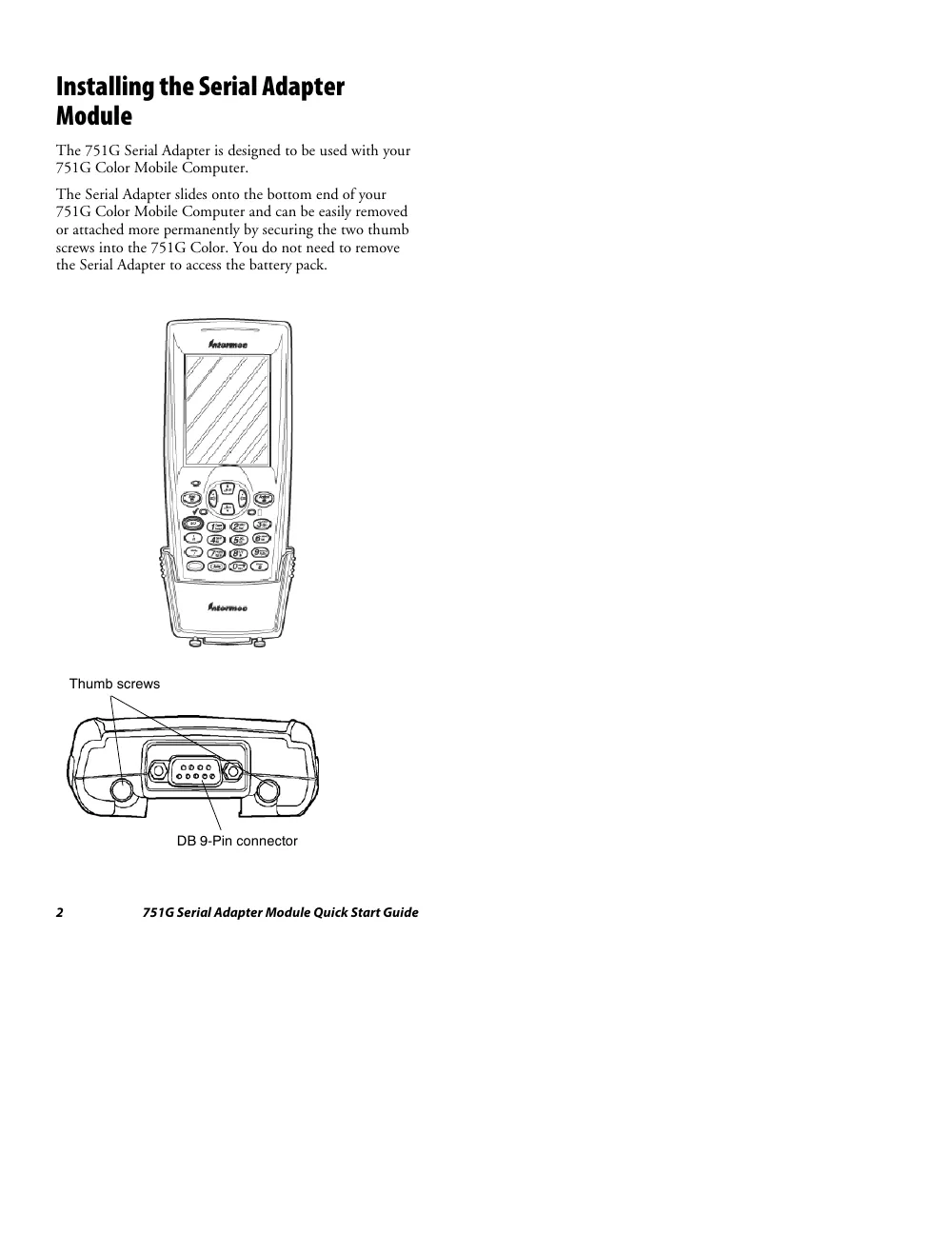
The text of page 2, from the PDF itself
Installing the Serial Adapter Module The 751G Serial Adapter is designed to be used with your 751G Color Mobile Computer. The Serial Adapter slides onto the bottom end of your 751G Color Mobile Computer and can be easily removed or attached more permanently by securing the two thumb screws into the 751G Color. You do not need to remove the Serial Adapter to access the battery pack.
Thumb screwsDB 9-Pin connector2
751G Serial Adapter Module Quick Start Guide
Page3of 4
Open in the PDF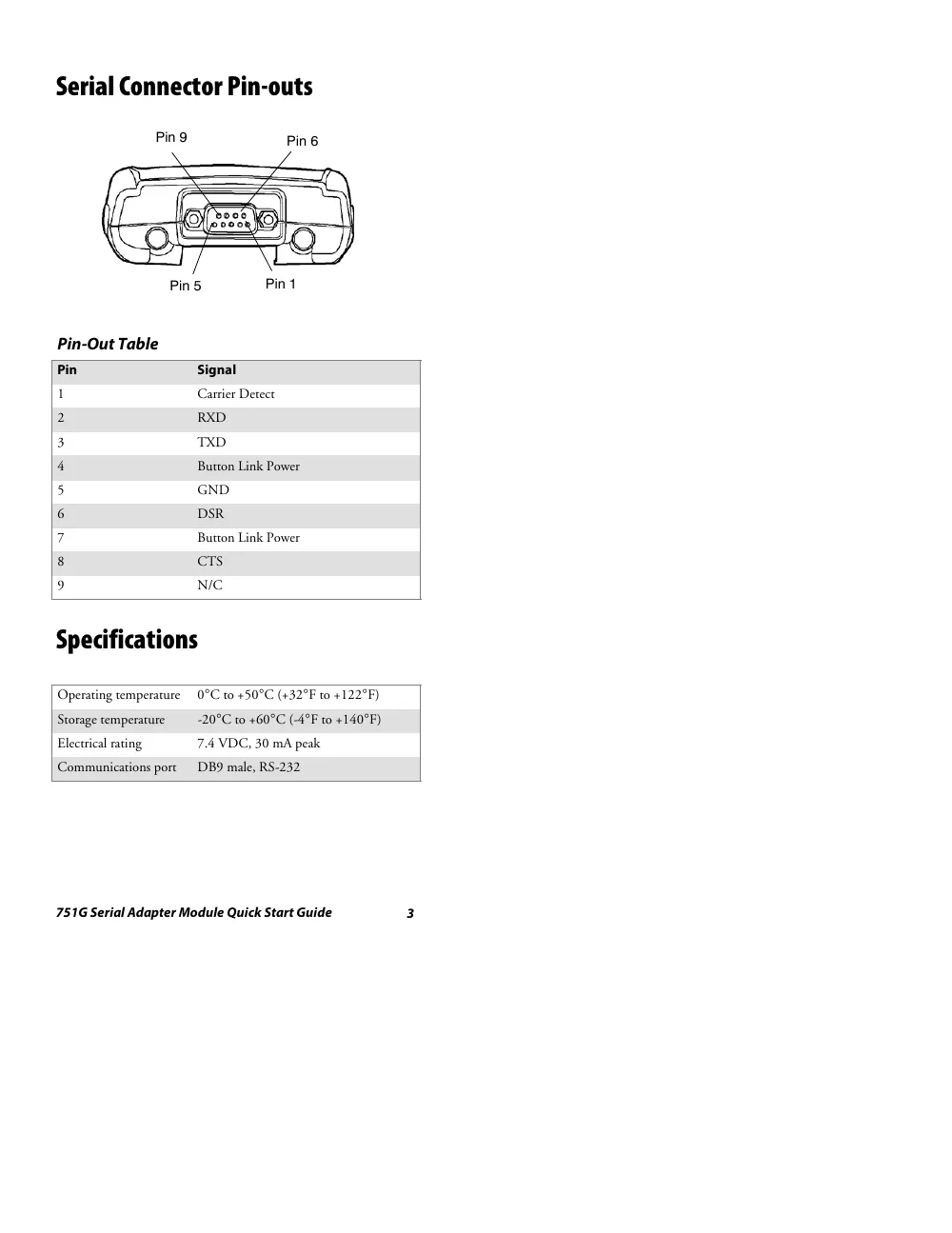
The text of page 3, from the PDF itself
Serial Connector Pin-outs Pin 9
Pin 6Pin 5Pin 1Pin-Out Table PinSignal1Carrier Detect2RXD3TXD4Button Link Power5GND6DSR7Button Link Power8CTS9N/C
Specifications Operating temperature
0°C to +50°C (+32°F to +122°F)
Storage temperature
-20°C to +60°C (-4°F to +140°F)
Electrical rating7.4 VDC, 30 mA peakCommunications portDB9 male, RS-232
751G Serial Adapter Module Quick Start Guide
3
Page4of 4
Open in the PDF
The text of page 4, from the PDF itself
Corporate Headquarters 6001 36th Avenue West Everett, Washington 98203 U.S.A. tel 425.348.2600 fax 425.355.9551 www.intermec.com E 2004 by Intermec Technologies Corporation. All rights reserved. 751G Serial Adapter Module Quick Start Guide September 2004
*962032010B* P/N: 962-032-010B
4
751G Serial Adapter Module Quick Start Guide