Manual · HP
HP Jornada 540 Series Pocket PC User's Guide
Manual135 pagesPDF 3.3 MB
User's guide for the HP Jornada 540 Series Pocket PC: setup, ActiveSync, networking, settings, programs and troubleshooting.
Covers · 1 model
The models it covers
Summary
What is in it
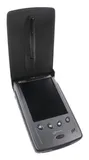
User's guide for the HP Jornada 540 Series, a Windows for Pocket PC handheld. It covers what is in the box, hardware features and first-time setup, connecting to a desktop PC with Microsoft ActiveSync, connecting to the Internet or a network through CompactFlash modem or network cards, power, memory and security settings, Pocket Outlook and the companion programs, HP accessories and CompactFlash cards, resetting and troubleshooting, support and the warranty. Appendixes cover character recognition and migrating data from other devices.
Its parts
- Welcome
- Getting started
- Connecting to your desktop PC
- Connecting to the Internet or to a network
- Configuring your HP Jornada
- Microsoft Pocket Outlook
- Companion programs
- Accessories
- Troubleshooting
- Support and service
- Warranty
From the manual
Key facts from this manual
Each line names its page in the PDF.
The user's guide for the HP Jornada 540 Series Pocket PC, a Windows for Pocket PC handheld. It covers the hardware, first-time setup, connecting to a desktop PC with ActiveSync, power and memory, accessories with their HP item numbers, and troubleshooting.
- What it is
- Pocket PC running Microsoft Windows for Pocket PC, with Pocket Outlook p. 5
- Ports
- USB/serial port, DC jack, infrared port, stereo headphone jack, Type I CompactFlash slot p. 14, 15
- Battery
- Built-in rechargeable Li-ion battery; charges whenever connected to AC power p. 62, 102
- Battery life
- About 8 hours of typical use between charges p. 62
- Data retention
- Up to 7 days when turned off at a low-power warning; 5 days after a battery very low shutdown p. 62
- Buttons
- On/Off, Record, Action, Notification button/LED, HP hot keys (home menu, Contacts, Calendar, Tasks), Reset p. 14, 15
- Operating temperature
- 0 to 40 ºC (32 to 104 ºF) p. 16
- Desktop software
- Microsoft ActiveSync 3.1 on Windows 2000, Windows NT Workstation 4.0 SP3 or later, or Windows 95/98 p. 32
- PC connection
- Serial or USB sync cable or cradle, or infrared; USB needs Windows 98 or 2000 p. 32, 33
- Cradles and cables
- USB Cradle F1820A, Serial Cradle F1834A, USB Cable F1821A, Serial Cable F1819A p. 94
- Power accessory
- AC Adapter F1817A, world wide voltage p. 94
- Other accessories
- Stylus Pens F1818A (three), Accessory Cover F1828A, Screen Protectors F1827A (six), leather cases F1829A and F1826A p. 94
- In the box
- Pocket PC, AC adapter, HP Jornada CD-ROM, ActiveSync CD-ROM, USB or serial sync cable or cradle depending on model p. 6
- Guide part number
- F1824-90003, Edition 1 p. 1
What this manual walks you through
- Setting up the Jornada for the first time p. 16, 17
- Using the hardware buttons and notification LED p. 18, 19
- Installing ActiveSync and connecting to a desktop PC by cable, cradle or infrared p. 32, 33, 34
- Managing power and memory p. 62, 63
- Installing a CompactFlash card p. 95
- Resetting the Jornada p. 98
- Restoring factory defaults p. 99, 100
- Solving basic power, display and software problems p. 100, 101, 102
Good to know
- Data is held in RAM: if the Jornada runs out of power, entered information, added programs and custom settings are lost. p. 62
- Restoring factory defaults erases all files, programs and data you have entered. p. 99
- USB and infrared connections are not supported by Windows NT. p. 33
- Software built for older Windows CE palm-size PCs such as the HP Jornada 430/420 may not run. p. 102
- Temperatures outside 0 to 40 ºC may damage the unit or cause loss of data. p. 16
Questions this manual answers
Can I replace the battery in the HP Jornada 540?
The guide describes an integral rechargeable Li-ion battery for operation and data retention; you charge it by connecting external power. p. 102
How long does the Jornada 540 battery last?
About 8 hours between charges in typical use; music or CompactFlash cards can shorten this significantly. p. 62
How do I reset an HP Jornada 540?
Disconnect the sync cable or cradle, remove any CompactFlash card, then press the Reset button on the back with the stylus. Unsaved data is lost. p. 98
What cradle fits the HP Jornada 540?
HP lists a USB Cradle (F1820A) and a Serial Cradle (F1834A) for all models of the 540 Series. p. 94
The whole text · 14 parts
Read the manual here as text
Its text as extracted from the PDF, unedited, in parts; each page opens the PDF at that page.
The file