Manual · HHP
Dolphin 7900 User's Guide
Manual204 pagesPDF 4.1 MB
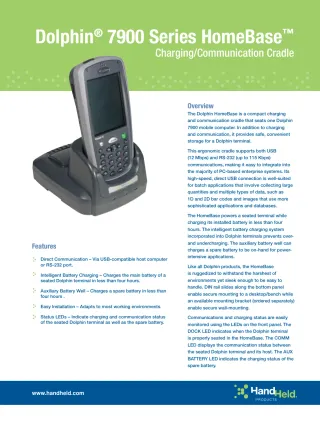
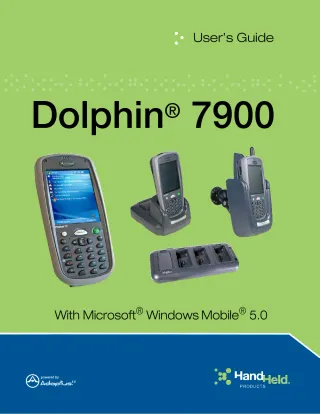
User's guide for the HHP Dolphin 7900 Windows Mobile handheld computer with imager, 802.11b, Bluetooth, GSM and GPS options.
Names · 1 model
The models it names
Filed with · 1 model
Also filed with these models on the old site
Summary
What is in it
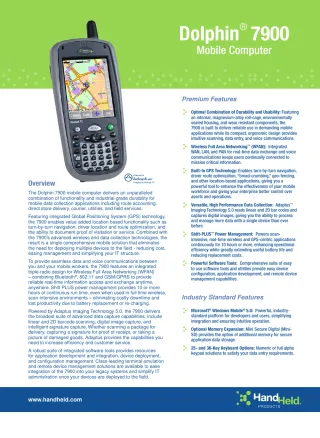
The user's guide for the Hand Held Products Dolphin 7900, a rugged handheld mobile computer with a built-in image engine for 1D and 2D bar codes and digital pictures. It covers first use and battery charging, the hardware, the image engine, the 25-key and 36-key keyboards, Windows Mobile settings, ActiveSync and infrared communications, the 802.11b, Bluetooth, GSM/GPRS and GPS options, and the QuadCharger, HomeBase, ChargeBase and Mobile Base peripherals.
Its parts
- Agency Approvals
- Getting Started
- Hardware Overview
- Using the Image Engine
- Using the Keyboards
- Settings
- Communications
- Wireless LAN (WLAN) Communications with 802.11b
- Wireless PAN (WPAN) Communications with Bluetooth
- Wireless WAN (WWAN) Communications with GSM/GPRS
- Dolphin 7900 with GPS
- Dolphin QuadCharger
- Dolphin HomeBase
- Dolphin ChargeBase
- Dolphin Mobile Base
From the manual
Key facts from this manual
Each line names its page in the PDF.
The Hand Held Products Dolphin 7900 User's Guide (Rev F, 10/16/07) for the Dolphin 7900 mobile computer with Windows Mobile 5.0. It covers first-time setup, resets, the hardware and battery, technical specifications, the image engine, keyboards, settings, the 802.11b, Bluetooth and GSM/GPRS radios, GPS, and the QuadCharger, HomeBase and ChargeBase peripherals.
- Device
- Windows Mobile 5.0 mobile computer with integrated imager, touch screen and wireless data and voice p. 1, 15
- Processor
- Intel X-Scale PXA255 400MHz p. 39
- Memory
- 64MB RAM x 64MB non-volatile Flash standard; 128MB RAM optional; Mini-SD slot p. 39
- Main battery
- 7.4V, 14.8 watt hour Li-ion rechargeable pack, hot-swappable p. 18, 40
- Backup battery
- Internal 3.6 Volt NiMH; keeps RAM and clock for up to 30 minutes without the main pack p. 36
- I/O connector
- 17-pin bottom connector: RS-232 up to 115 Kbps, USB up to 12 Mbps, charging; power out 5V at 500mA p. 35
- Display
- 3.8 in. 240 x 320 backlit TFT color display with industrial touch screen p. 15
- Keyboards
- 25-key numeric alpha or 36-key alpha numeric p. 39
- WWAN modules
- GSM/GPRS MC-45 (900/1800/1900 MHz), MC-46 (850/1800/1900 MHz), MC-75 (850/900/1800/1900 MHz) p. 39
- WLAN and WPAN
- IEEE 802.11b DSSS; Bluetooth radio (Class 2) p. 39
- Image engines
- 5300 Standard Range (5300SR), 5100 Smart Focus (5100SF) or 5300 Smart Focus (5300SF); reads 1D and 2D codes p. 41
- Size
- 7.3 in. L x 3.5 in. W x 1.7 in. D max (185 x 89 x 43 mm) p. 39
- Weight
- Batch 17 oz. (482 gm); WLAN 17.3 oz.; WPAN 17.1 oz.; WLAN/WPAN 18.9 oz. (536 gm) p. 39
- In the box
- Terminal, 7.4v Li-ion main battery pack, Microsoft Companion CD, Dolphin 7900 Quick Start Guide p. 19
What this manual walks you through
- Setting up the terminal for the first time p. 19
- Soft and hard resets of the terminal p. 25
- Charging the main and backup batteries and setting low battery warnings p. 36, 37
- Enabling 5V power out on the I/O connector p. 35
- Image engine working ranges and supported bar code symbologies p. 41, 42
- Installing a SIM card and using the phone audio modes p. 138
- Powering the GPS module through the I/O connector p. 160
- Charging and analyzing batteries in the QuadCharger p. 169, 170
- QuadCharger troubleshooting by status LED p. 172
- Powering the HomeBase and charging a spare battery p. 176, 177
Good to know
- A hard reset erases all data and applications stored in RAM. p. 25
- Use only Li-ion battery packs provided by Hand Held Products; others may damage the terminal or battery. p. 36
- Store batteries between -4 and 104 F (-20 and 40 C), not in a powered charger for long periods. p. 38
- The headset jack takes only a 2.5mm plug. p. 138
- Do not remove a battery from the QuadCharger analyze slot until the cycle is complete. p. 170
Questions this manual answers
How do I soft reset a Dolphin 7900?
Press and hold the Red and ESC keys for about five seconds; RAM data is kept. p. 25
How do I hard reset the Dolphin 7900?
Press and hold the Red and TAB keys for about five seconds; this erases RAM data and RAM installed applications. p. 25
What battery does the Dolphin 7900 take?
A 7.4V, 14.8 watt hour Li-ion rechargeable main battery pack, plus an internal 3.6 Volt NiMH backup battery. p. 36
What voltage does the Dolphin 7900 HomeBase supply?
The terminal needs 9.5 volts DC; the HomeBase power adapter converts the source to 9.5 volts DC. p. 176
Contents
Chapters and sections
Each line opens the PDF at its page.
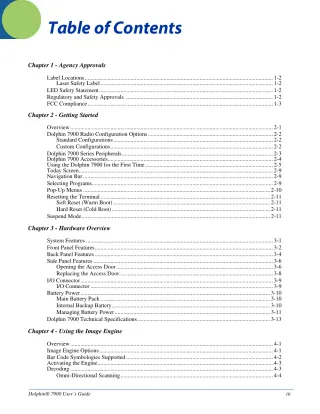
- Dolphin® 7900 User's Guide1
- Agency Approvals9
- Getting Started15
- Hardware Overview27
- Using the Image Engine41
93 more lines, from page 47 on
- Using the Keyboards47
- Settings57
- Communications75
- Wireless LAN (WLAN) Communications with 802.11b85
- Wireless PAN (WPAN) Communications with Bluetooth113
- Wireless WAN (WWAN) Communications with GSM/GPRS137
- Dolphin 7900 with GPS159
- Dolphin QuadCharger167
- Dolphin HomeBase173
- Dolphin ChargeBase185
- Dolphin Mobile Base191
- Customer Support199
The whole text · 24 parts
Read the manual here as text
Its text as extracted from the PDF, unedited, in parts; each page opens the PDF at that page.
- Pages 1 to 81-8
- Agency Approvals9-14
- Getting Started15-26
- Hardware Overview27-40
- Using the Image Engine41-46
- Using the Keyboards47-56
- Settings, pages 57 to 6557-65
- Settings, pages 66 to 7466-74
- Communications75-84
- Wireless LAN (WLAN) Communications with 802.11b, pages 85 to 9485-94
- Wireless LAN (WLAN) Communications with 802.11b, pages 95 to 10495-104
- Wireless LAN (WLAN) Communications with 802.11b, pages 105 to 112105-112
- Wireless PAN (WPAN) Communications with Bluetooth, pages 113 to 120113-120
- Wireless PAN (WPAN) Communications with Bluetooth, pages 121 to 128121-128
- Wireless PAN (WPAN) Communications with Bluetooth, pages 129 to 136129-136
- Wireless WAN (WWAN) Communications with GSM/GPRS, pages 137 to 144137-144
- Wireless WAN (WWAN) Communications with GSM/GPRS, pages 145 to 152145-152
- Wireless WAN (WWAN) Communications with GSM/GPRS, pages 153 to 158153-158
- Dolphin 7900 with GPS159-166
- Dolphin QuadCharger167-172
- Dolphin HomeBase173-184
- Dolphin ChargeBase185-190
- Dolphin Mobile Base191-198
- Customer Support199-204
The file