Manual · Epson
TM-U950 User's Manual
Manual12 pagesPDF 263 KB
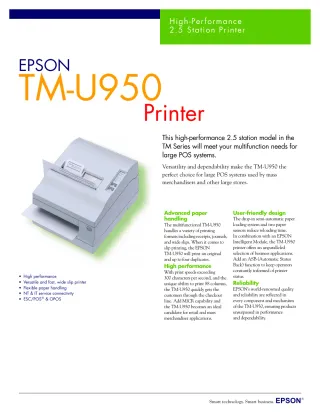
User's manual for the Epson TM-U950 impact receipt, journal and slip printer: setup, paper and ribbon loading, MICR, troubleshooting and specifications.
Covers · 2 models
The models it covers
Summary
What is in it
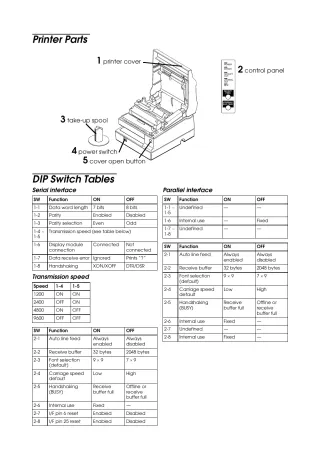
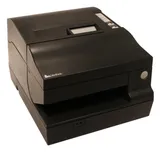
User's manual (English section) for the Epson TM-U950 serial impact dot matrix POS printer, which prints on receipt and journal paper rolls and on slip paper. It shows the printer parts and DIP switch tables for the serial and parallel interfaces, safety precautions, unpacking, the control panel, loading paper rolls, slips and the ERC-31 ribbon, using and cleaning the optional MICR check reader, troubleshooting, clearing paper jams and full specifications.
From the manual · read page by page
Key facts from this manual
Each line names its page in the PDF.
Epson's multilingual user's manual for the TM-U950 receipt, journal and slip printer; the English section is the one summarized here. It covers the DIP switches for the serial and parallel interfaces, the control panel, loading paper rolls, slips and the ribbon, using and cleaning the optional MICR check reader, troubleshooting and clearing jams. The last page lists the printer's specifications.
- Print method
- Serial impact dot matrix, 9-pin head; bidirectional, minimum distance printing p. 12
- Interfaces
- Serial or parallel, each with its own DIP switch table p. 2
- Serial speeds
- 1200, 2400, 4800 or 9600 bps, set by DIP switches 1-4 and 1-5 p. 2
- Print speed
- High-speed: 233 characters/second (9 × 9), 311 characters/second (7 × 9) p. 12
- Characters per line
- 9 × 9: roll paper 30, slip 66; 7 × 9: roll paper 40, slip 88 p. 12
- Ribbon
- EPSON ERC-31 ribbon cassette p. 8, 12
- Roll paper
- Single-ply, 69.5 ± 0.5 mm wide, 83 mm maximum outside diameter p. 12
- Slip copies
- Original + 4 at 20 to 40°C; original + 1 to 3 copies at 5 to 40°C p. 12
- Power
- +24 VDC ± 10%; approx. 1.8 A mean, approximately 8.0 A peak when printing p. 12
- Buffer
- 32 bytes or 2 KB, by DIP switch p. 12
- MICR option
- Optional factory-installed MICR reader for personal checks p. 8
- Printing width
- Roll paper: 61.1 mm {2.41"}; slip paper: 135.6 mm {5.34"} p. 12
- Dimensions and weight
- 194.5 × 251 × 298 mm (H × W × D); approximately 5.6 kg {12.3 lb} p. 12
- Model names
- TM-U950/U950P, model M62UA/M114A p. 3
What this manual walks you through
- Setting the DIP switches p. 2
- Reading the control panel buttons and LEDs p. 5, 6
- Removing the transportation damper and fitting the power switch cover p. 6
- Installing the receipt and journal paper rolls and the take-up spool p. 6, 7
- Inserting slip paper p. 8
- Installing a ribbon cassette p. 8
- Reading checks with the MICR reader p. 8, 9
- Cleaning the MICR head and feed roller p. 9, 10
- Troubleshooting the LEDs and print problems p. 10
- Removing jammed paper and opening the cutter p. 10, 11
Good to know
- Do not connect a telephone line to the drawer kick-out connector or the display module connector. p. 4
- Install both paper rolls even when printing only on slips or reading checks, to prevent paper jams. p. 8, 9
- Do not insert stapled or wrinkled checks into the MICR reader. p. 9
- A missing line of dots may mean a damaged print head: stop printing and contact a qualified servicer. p. 10
- The print head can be very hot after printing. p. 10
Questions this manual answers
What ribbon does the Epson TM-U950 use?
The EPSON ERC-31 ribbon cassette. p. 8
How often should I clean the TM-U950 MICR reader?
Clean the MICR head and roller every 6000 passes or once a month, or when reading errors are frequent. p. 9
Why is the ERROR LED on the TM-U950 flashing?
If there is no paper jam, the print head may be overheated; printing resumes once it cools. If not, turn the printer off for 10 seconds and back on. p. 10
How do I insert a check for MICR reading on the TM-U950?
When the SLIP light flashes, insert the check face down with the MICR characters on the right, straight into the inlet, and let go once the printer draws it in. p. 9
What baud rates does the TM-U950 serial interface support?
1200, 2400, 4800 or 9600, set with DIP switches 1-4 and 1-5. p. 2
The whole text · 2 parts
Read the manual here as text
Its text as extracted from the PDF, unedited, in parts; each page opens the PDF at that page.
The file