Manual · Epson
TM-T85/T85P Thermal Line Printer Operator's Manual
Manual115 pagesPDF 2.6 MB
Operator's manual for the Epson TM-T85 and TM-T85P thermal receipt printers: installation, DIP switches, troubleshooting and commands.
Covers · 1 model
The models it covers
Summary
What is in it
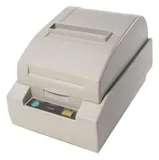
Operator's manual for the Epson TM-T85 and TM-T85P one-station thermal line printers used for coupons, ECR and POS receipts. It covers unpacking, removing the transportation spacer, connecting the computer, cash drawer and power supply, loading the paper roll, the self test, DIP switch settings and the paper near end detector, then buttons and lights, troubleshooting with the hexadecimal dump, specifications, character code tables and the ESC/POS control commands.
Its parts
- Introduction
- Chapter 1 Installation
- Chapter 2 Using the Printer
- Chapter 3 Troubleshooting
- Chapter 4 Reference Information
- Chapter 5 Commands
From the manual
Key facts from this manual
Some pages are scans or cannot be read; this says only what the readable text supports. Each line names its page in the PDF.
Epson's operator's manual for the TM-T85 and TM-T85P thermal line printers, one-station receipt and coupon printers for ECR and POS use. The TM-T85 has a serial interface and the TM-T85P a parallel one. It covers setup, DIP switch settings, the control panel, troubleshooting, specifications and the command set.
- Device
- One-station thermal line printer for coupons, ECR and POS use p. 8
- Interfaces
- TM-T85: RS-232 compatible serial; TM-T85P: IEEE 1284 compatible parallel (Nibble/Byte Modes) p. 15, 16, 50
- Print speed
- Approx. 12 lines/second; approx. 50 mm (2")/second continuous feed p. 47
- Resolution
- 180 x 180 dpi; 72mm (2.83") print width, 512 dot positions p. 47
- Characters per line
- Font A (12 x 24): 42; Font B (9 x 24): 56 p. 47, 48
- Paper
- Thermal paper roll, 80 mm wide, 83mm max diameter; NTP080-80 (Nakagawa Seisakujo) named p. 49
- Power
- +24 VDC ± 7%; Epson Power Supply PS-150 recommended p. 20, 49
- Current draw
- Operating mean approx. 1.5A, peak approx. 6.0A; standby mean approx. 0.1A p. 49
- Operating temperature
- 5 to 40 °C (41 to 104 °F); 30 to 85% RH p. 50
- Receive buffer
- 4K bytes or 45 bytes, set by DIP switch p. 27, 28
- Serial speeds
- TM-T85: 2400, 4800, 9600 or 19200 bps, set by DIP switches 1-7 and 1-8 p. 27
- Command set
- ESC/POS based, with page mode and bar code printing p. 8
- Model names
- M65TA / M116A p. 5
- Drawer
- Drawer kick-out connector on the bottom, next to the interface connector p. 17
What this manual walks you through
- Removing the transportation spacer before first use p. 13, 14
- Connecting the printer to a computer, a cash drawer, ground and power p. 15, 16, 17, 19, 20
- Loading the paper roll p. 21, 22
- Running the self test p. 24, 25
- Setting the DIP switches for interface and print density p. 25, 26, 27, 28, 29
- Adjusting the paper near end detector p. 30, 31
- Reading the POWER, ERROR and PAPER lights p. 33, 34
- Troubleshooting power, printing and paper problems, and cleaning the print head p. 39, 40, 41
- Clearing a paper jam and resetting the auto cutter blade p. 41, 42, 43, 44
- Using the hexadecimal dump to see incoming data p. 45, 46
Good to know
- Do not connect a telephone line to the drawer kick-out connector. p. 17
- Using an incorrect power supply can seriously damage the printer. p. 20
- The print head gets very hot during printing; let it cool and do not touch it with your fingers. p. 40, 41
- Changed DIP switch settings take effect only after the printer is turned off and on or reset (except TM-T85 switches 2-7 and 2-8). p. 29
- The interface is a factory installed option: one of serial or parallel is already installed. p. 50
Questions this manual answers
What power supply does the Epson TM-T85 use?
An external +24 VDC supply; the manual recommends the Epson Power Supply PS-150. p. 20, 49
What is the difference between the TM-T85 and TM-T85P?
The TM-T85 connects through a serial interface cable and the TM-T85P through a parallel interface cable. p. 15, 16
How do I run a self test on the TM-T85?
Close the printer cover, then hold down the PAPER FEED button while turning the printer on with the POWER button. p. 24
Why is the ERROR light flashing on my TM-T85?
The auto cutter may be jammed or the print head may be too hot; printing resumes by itself when the head cools. p. 39
What paper width does the TM-T85 take?
An 80 mm thermal paper roll, up to 83mm in total diameter. p. 49
Contents
Chapters and sections
Each line opens the PDF at its page.
- Introduction8
- Chapter 1 Installation12
- Unpacking12
- Removing the Transportation Spacer13
- Connecting the Printer to the Computer15
- Connecting the Printer to the Drawer17
- Grounding the Printer19
- Connecting the Power Supply20
- Arranging the Interface Cable21
- Installing the Paper Roll21
- Running the Self Test24
- Setting the DIP Switches25
- Adjusting the Paper Near End Detector30
- Affixing the Fastening Tape (Optional)32
- Chapter 2 Using the Printer33
- Chapter 3 Troubleshooting39
- Chapter 4 Reference Information47
- Chapter 5 Commands59
The whole text · 14 parts
Read the manual here as text
Its text as extracted from the PDF, unedited, in parts; each page opens the PDF at that page.
- Pages 1 to 71-7
- Introduction8-10
- Pages 11 to 1811-18
- Pages 19 to 2619-26
- Pages 27 to 3227-32
- Chapter 2 Using the Printer33-38
- Chapter 3 Troubleshooting39-46
- Chapter 4 Reference Information47-58
- Chapter 5 Commands, pages 59 to 6859-68
- Chapter 5 Commands, pages 69 to 7869-78
- Chapter 5 Commands, pages 79 to 8879-88
- Chapter 5 Commands, pages 89 to 9889-98
- Chapter 5 Commands, pages 99 to 10899-108
- Chapter 5 Commands, pages 109 to 115109-115
The file