Manual · Datamax
Prodigy Plus Operator's Manual
Manual84 pagesPDF 5.2 MB
Operator's manual for the Datamax Prodigy Plus thermal label printer: setup, media and ribbon loading, printing, troubleshooting, specs.
Filed with · 1 model
Also filed with these models on the old site
Summary
What is in it
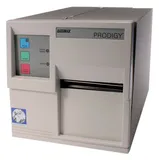
The Datamax operator's manual for the Prodigy Plus and Prodigy Plus 152 direct thermal and thermal transfer label printers. It covers unpacking, parts of the printer, the control panel, loading media and ribbon, peel-off and rewind, programming commands and examples, configuration and test labels, print quality and printhead alignment, troubleshooting and cleaning, with appendices on switch settings and cables, fonts and barcodes, error codes and specifications.
Its parts
- Getting Started
- Printing Labels
- Troubleshooting
- Maintenance
From the manual
Key facts from this manual
Each line names its page in the PDF.
This is the Datamax Prodigy Plus Operator's Manual, covering the Prodigy Plus and Prodigy Plus 152 thermal label printers; the plain Prodigy appears only as a switch setting. It explains setup, loading media and ribbon, the control panel, configuration and test labels, DIP switch settings, troubleshooting, error codes, cables and specifications.
- Device
- Thermal label printer, direct thermal or thermal transfer p. 9, 73
- Resolution
- Prodigy Plus: 203 dpi (8 dots/mm); Prodigy Plus 152: 152 dpi p. 73
- Print speed
- 2.0 to 8.0 in. (51 to 203 mm) per second p. 73
- Interface
- Serial RS-232C/RS-422 at 300 to 9600 baud, DB25 connector on the rear p. 12, 77
- Power
- 115 VAC or 230 VAC ± 10%, single phase 50/60 Hz p. 78
- Interface cables
- 556000, 556001, 556002 and 899516; 899516 is the parallel to serial adapter p. 69, 72
- Max print width
- 4.1 in. (104mm) at 203 dpi p. 73
- Max print length
- 5.25 in. (133mm) with standard RAM; up to 20.25 in. (514mm) with the optional 512K memory module p. 73
- Media
- 0.75 to 4.65 in. (19 to 118mm) wide, 0.0025 to 0.0100 in. thick; roll-fed labels, tags, tickets p. 75
- Ribbon
- Black or colored, 1182 ft (360 meters) long, on 1-inch cores p. 75
- Barcodes
- Code 39, Interleaved 2 of 5, Code 128, Codabar, UPC-A, UPC-E, EAN-8, EAN-13, MSI Plessey, Postnet, UCC/EAN 128, PDF-417 (203 DPI only) p. 74
- Operating temperature
- 40°F to 90°F (4°C to 32°C), 10% to 95% humidity non-condensing p. 78
- Size and weight
- 10 in. H x 10 in. W x 18 in. D; 36 lbs. (16.33 kg) p. 78
- Options
- Cutter with tray, present sensor, ribbon saver, RAM and Flash memory modules, font cartridges, Centronics parallel adapter p. 79
What this manual walks you through
- Installing the front door p. 13
- Using the control panel buttons, lights and darkness control p. 14, 15
- Loading label media and adjusting the media sensor p. 16, 17
- Setting up label rewind and peel-off mode p. 18, 19
- Loading thermal transfer ribbon p. 20
- Sending programming commands with attention getters p. 21
- Printing configuration and test labels p. 29, 30
- Troubleshooting print and feed problems p. 40, 41, 42, 43
- Setting baud rate and word length on the rear DIP switch p. 49, 50
- Reading the error codes the printer sends to the host p. 67
Good to know
- Peel-off mode without the present sensor installed and enabled can jam labels. p. 19
- A reflective sensor mark must be carbon based. p. 75
- Translucent (colored) ribbons may need switch 1-7 on the back turned on. p. 20
- The printer is for indoor use only. p. 3
Questions this manual answers
What does error code R mean on a Prodigy Plus?
It is sent every time the printer is turned on and signals a hardware reset. p. 67
How do I print a configuration label on the Prodigy Plus?
Hold the Feed button while turning the printer on until it feeds one label, then release it; the configuration and test label prints. p. 29
What is the part number of the Prodigy Plus parallel adapter?
899516, a parallel to serial adapter that needs no external power. p. 72
How wide a label does the Prodigy Plus take?
Media from 0.75 in. (19mm) to 4.65 in. (118mm) wide; the maximum print width is 4.1 in. at 203 dpi. p. 73, 75
Why does the Prodigy Plus feed only about an inch each time I press Feed?
The thermal transfer switch is probably on with no ribbon installed; slide it back for direct thermal printing. p. 17
The whole text · 9 parts
Read the manual here as text
Its text as extracted from the PDF, unedited, in parts; each page opens the PDF at that page.
The file