


Manual · Datalogic
Datalogic Memor Single Cradle Technical Features
Manual2 pagesPDF 763 KB
Both pages are below, each with its text.
Covers · 1 model
The models it covers
From the manual · read page by page
Key facts from this manual
Each line names its page in the PDF.
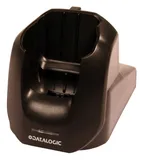
This two-page guide covers the Datalogic Memor Single Cradle, the desktop cradle for the Datalogic Memor mobile computer. It lists the technical features and shows how to connect the cradle to a host by USB or RS232, charge a spare battery and read the LEDs.
- Device
- Single cradle for the Datalogic Memor mobile computer: a communication adapter to the host and a battery charger p. 1
- Host interfaces
- RS232 up to 115200 b/sec; USB 1.1 up to 12 Mb/sec p. 1
- Connectors
- Mini USB connector, RS232 connector, power jack, spare battery slot p. 1
- Power
- 5 VDC ± 5%, max. 2.5 A p. 1
- Power supply
- 94ACC1324 PG5-30P35 AC/DC power supply, EU/USA plug p. 1, 2
- Spare battery slot
- Charges a 1000 mAh or 2000 mAh Li-Ion battery pack p. 1
- Charge time
- 1000 mAh Li-Ion: max. 3 hours; 2000 mAh Li-Ion: 4.5 hours with terminal inserted, 3.5 hours without p. 1
- USB cable
- Any standard Mini USB cable, for example 94A051016 CAB-421 p. 2
- RS232 cable
- Any standard null modem cable with a 9-pin female D-Sub, for example 94A051020 CAB-427 p. 2
- Indicators
- Power on LED (green); spare battery charge LED (bi-colored) p. 1
- Dimensions
- 105 X 75 X 80 mm (4.13 X 2.95 X 3.15 in) p. 1
- Weight
- 256 g (9.03 oz) p. 1
- Protection, humidity
- IP50; 80% non condensing p. 1
- Host software link
- Standard ActiveSync connection through the cradle p. 1
What this manual walks you through
- Connecting the cradle to a host by USB p. 2
- Connecting the cradle to a host by RS232 p. 2
- Charging the mobile computer and a spare battery p. 2
- Reading the cradle LED indicators p. 2
Good to know
- No power supply is needed for communication; it is needed only for battery charging. p. 1
- The battery must be charged at 0° to +45 °C (+32° to +113 °F). p. 1
- During charging the LED may turn off to show a temporary suspension of charging. p. 2
- The cradle is a Class A digital device under FCC Part 15. p. 1
Questions this manual answers
Does the Memor cradle need power to sync with a PC?
No. Power is needed only to charge the mobile computer and spare battery, not for communication. p. 1
What power supply does the Datalogic Memor cradle use?
The recommended unit is the 94ACC1324 PG5-30P35 AC/DC power supply with EU/USA plug; the cradle takes 5 VDC. p. 1
How long does a Memor spare battery take to charge in the cradle?
A 1000 mAh battery takes up to 3 hours; a 2000 mAh battery takes 4.5 hours with the terminal inserted or 3.5 hours without. p. 1
What cable connects the Memor cradle to a computer?
Any standard Mini USB cable (for example 94A051016 CAB-421), or a standard null modem cable for RS232. p. 2
The file
Size and text
Every page · 2
Read it here
Each page as it is printed, and its words beside it, so a phone can search and copy them.
Page1of 2
Open in the PDF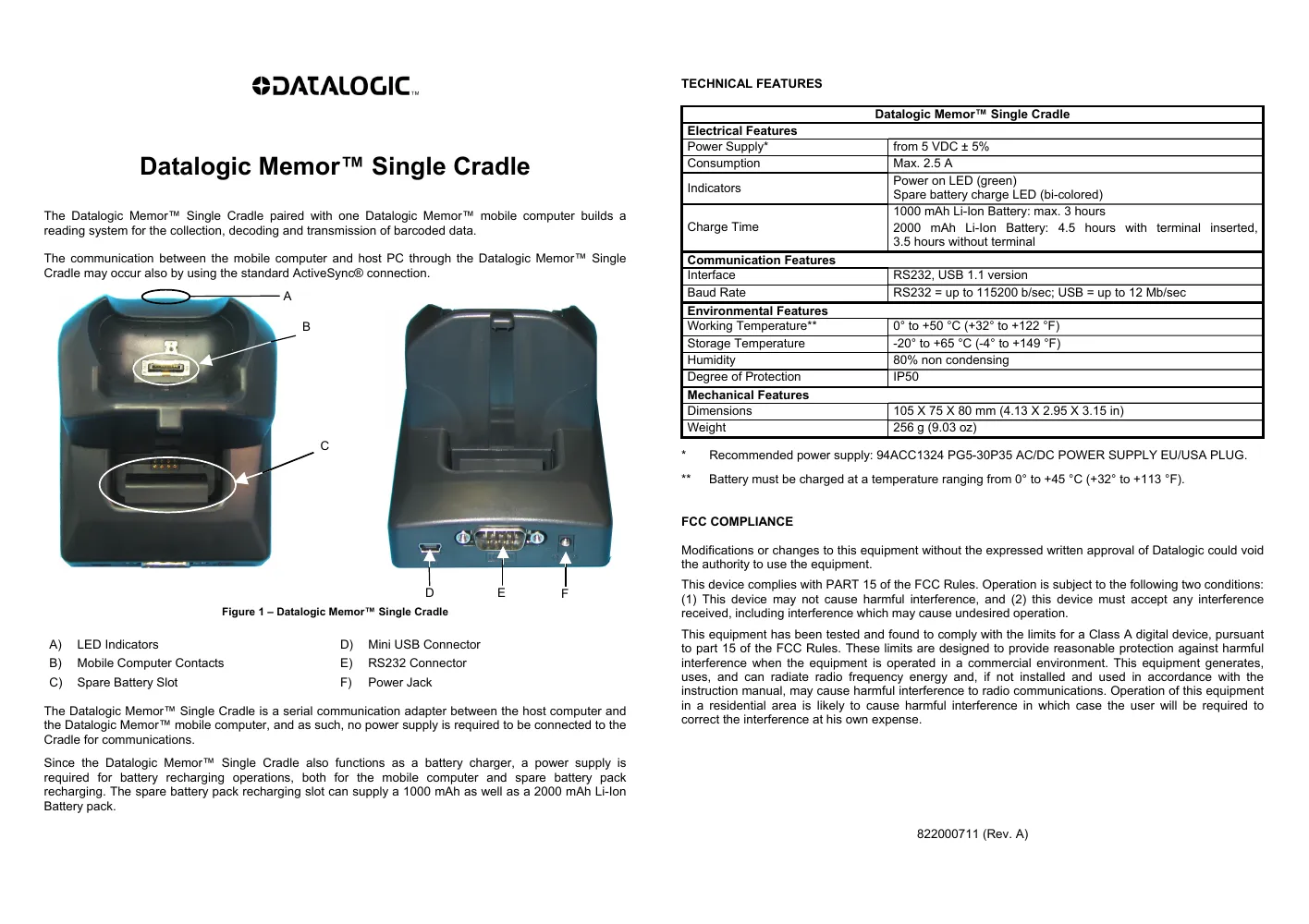
The text of page 1, from the PDF itself
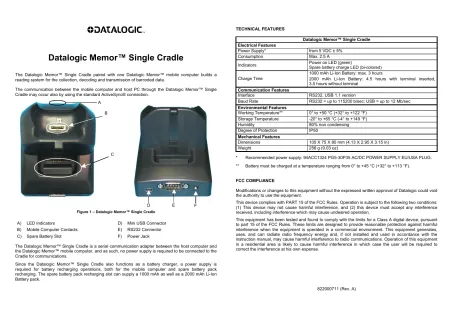
TECHNICAL FEATURES Datalogic Memor™ Single Cradle Electrical Features Power Supply* Consumption
Datalogic Memor™ Single Cradle
Indicators The Datalogic Memor™ Single Cradle paired with one Datalogic Memor™ mobile computer builds a reading system for the collection, decoding and transmission of barcoded data.
Charge Time
The communication between the mobile computer and host PC through the Datalogic Memor™ Single Cradle may occur also by using the standard ActiveSync® connection.
Communication Features Interface Baud Rate Environmental Features Working Temperature** Storage Temperature Humidity Degree of Protection Mechanical Features Dimensions Weight
A B
C
from 5 VDC ± 5% Max. 2.5 A Power on LED (green) Spare battery charge LED (bi-colored) 1000 mAh Li-Ion Battery: max. 3 hours 2000 mAh Li-Ion Battery: 4.5 hours with terminal inserted, 3.5 hours without terminal RS232, USB 1.1 version RS232 = up to 115200 b/sec; USB = up to 12 Mb/sec 0° to +50 °C (+32° to +122 °F) -20° to +65 °C (-4° to +149 °F) 80% non condensing IP50 105 X 75 X 80 mm (4.13 X 2.95 X 3.15 in) 256 g (9.03 oz)
*
Recommended power supply: 94ACC1324 PG5-30P35 AC/DC POWER SUPPLY EU/USA PLUG.
**
Battery must be charged at a temperature ranging from 0° to +45 °C (+32° to +113 °F).
FCC COMPLIANCE Modifications or changes to this equipment without the expressed written approval of Datalogic could void the authority to use the equipment. D
E
F
Figure 1 – Datalogic Memor™ Single Cradle
A)LED IndicatorsD)Mini USB ConnectorB)
Mobile Computer Contacts
E)RS232 ConnectorC)Spare Battery SlotF)Power Jack
The Datalogic Memor™ Single Cradle is a serial communication adapter between the host computer and the Datalogic Memor™ mobile computer, and as such, no power supply is required to be connected to the Cradle for communications.
This device complies with PART 15 of the FCC Rules. Operation is subject to the following two conditions: (1) This device may not cause harmful interference, and (2) this device must accept any interference received, including interference which may cause undesired operation. This equipment has been tested and found to comply with the limits for a Class A digital device, pursuant to part 15 of the FCC Rules. These limits are designed to provide reasonable protection against harmful interference when the equipment is operated in a commercial environment. This equipment generates, uses, and can radiate radio frequency energy and, if not installed and used in accordance with the instruction manual, may cause harmful interference to radio communications. Operation of this equipment in a residential area is likely to cause harmful interference in which case the user will be required to correct the interference at his own expense.
Since the Datalogic Memor™ Single Cradle also functions as a battery charger, a power supply is required for battery recharging operations, both for the mobile computer and spare battery pack recharging. The spare battery pack recharging slot can supply a 1000 mAh as well as a 2000 mAh Li-Ion Battery pack. 822000711 (Rev. A)
Page2of 2
Open in the PDF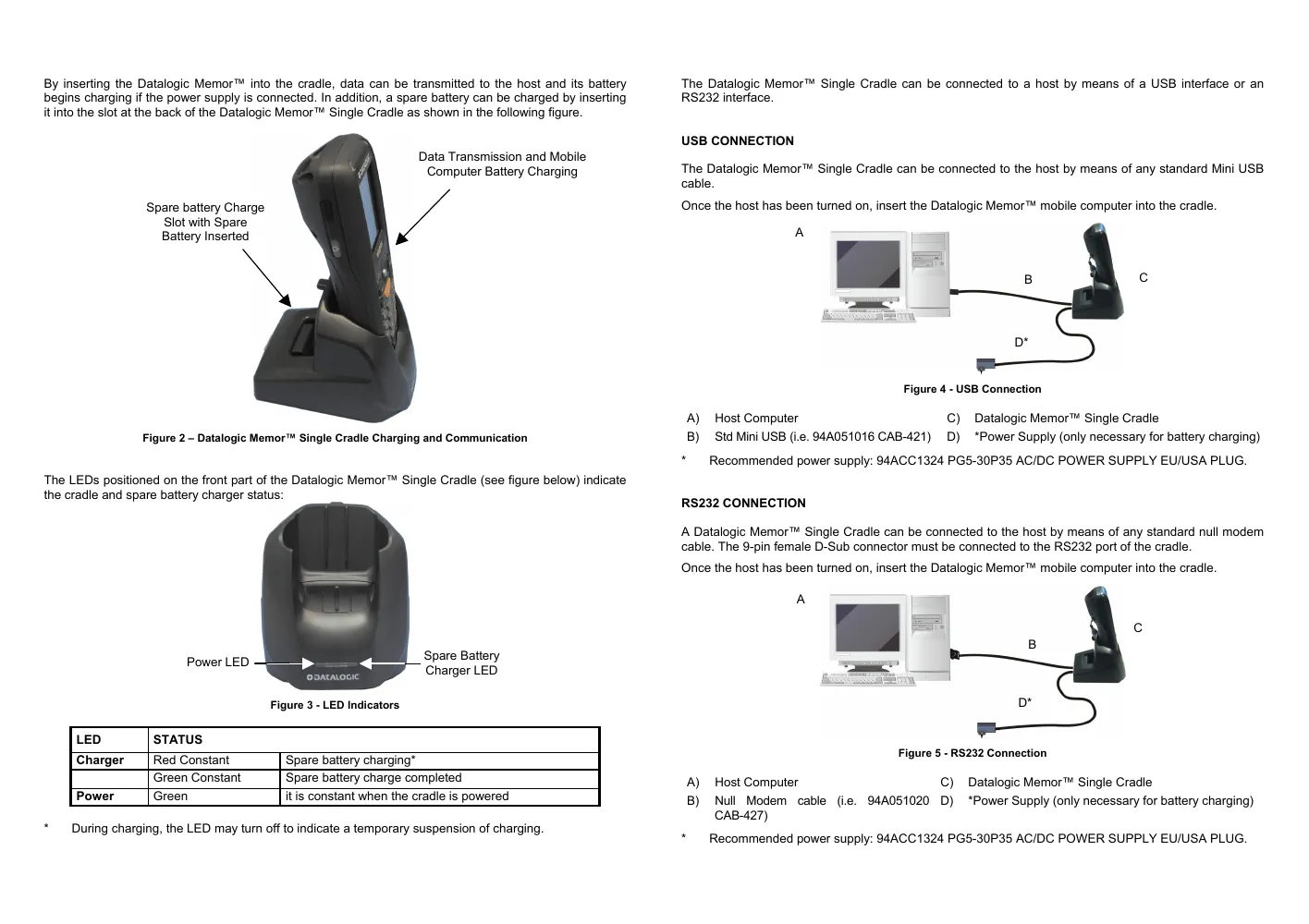
The text of page 2, from the PDF itself
By inserting the Datalogic Memor™ into the cradle, data can be transmitted to the host and its battery begins charging if the power supply is connected. In addition, a spare battery can be charged by inserting it into the slot at the back of the Datalogic Memor™ Single Cradle as shown in the following figure.
The Datalogic Memor™ Single Cradle can be connected to a host by means of a USB interface or an RS232 interface. USB CONNECTION
Data Transmission and Mobile Computer Battery Charging
The Datalogic Memor™ Single Cradle can be connected to the host by means of any standard Mini USB cable. Once the host has been turned on, insert the Datalogic Memor™ mobile computer into the cradle.
Spare battery Charge Slot with Spare Battery Inserted
ABCD*
Figure 4 - USB Connection
Figure 2 – Datalogic Memor™ Single Cradle Charging and Communication
A)Host ComputerC)
Datalogic Memor™ Single Cradle
B)
Std Mini USB (i.e. 94A051016 CAB-421)
D)
*Power Supply (only necessary for battery charging)
* The LEDs positioned on the front part of the Datalogic Memor™ Single Cradle (see figure below) indicate the cradle and spare battery charger status:
Recommended power supply: 94ACC1324 PG5-30P35 AC/DC POWER SUPPLY EU/USA PLUG.
RS232 CONNECTION A Datalogic Memor™ Single Cradle can be connected to the host by means of any standard null modem cable. The 9-pin female D-Sub connector must be connected to the RS232 port of the cradle. Once the host has been turned on, insert the Datalogic Memor™ mobile computer into the cradle. A C B
Spare Battery Charger LED
Power LED
D*
Figure 3 - LED Indicators
LEDSTATUSCharger
Red Constant Green Constant Green
Power *
Figure 5 - RS232 Connection
Spare battery charging* Spare battery charge completed it is constant when the cradle is powered
During charging, the LED may turn off to indicate a temporary suspension of charging.
*A)Host ComputerB)
Null Modem cable (i.e. 94A051020 D) CAB-427)
C)
Datalogic Memor™ Single Cradle *Power Supply (only necessary for battery charging)
Recommended power supply: 94ACC1324 PG5-30P35 AC/DC POWER SUPPLY EU/USA PLUG.