


Spec sheet · Compumatic
Compumatic XLS21 Spec Sheet
Spec sheet1 pagePDF 64 KB
The page is below, with its text.
Covers · 1 model
The models it covers
From the sheet · read page by page
Key facts from this sheet
Each line names its page in the PDF.
One-page spec sheet for the Compumatic XLS 21 time and attendance system, made up of the XLS 21 terminal and CompuTime101 software. It lists what the package includes, the standard software features, the CompuTime101 software options, the accessories and the terminal's hardware features.
- System
- Time and attendance terminal sold with CompuTime101 software p. 1
- Employee entry
- PIN entry, proximity badges, or both p. 1
- Communication
- RS232 serial and Ethernet (TCPIP); optional USB flash drive download p. 1
- Terminal capacity
- 30,000 users; 100,000 punch transaction buffer memory; battery backup p. 1
- Software capacity
- 25 employees, upgradable to 50, 100, 250, or unlimited p. 1
- In the package
- XLS 21 terminal, CompuTime101 software, 25' RS232 cable, 5' Ethernet cable, mounting bracket, hardware, instructions, AC power supply p. 1
- Computer link
- A constant computer connection is not required; Auto Poll downloads punches on a schedule p. 1
- Pay periods and overtime
- Weekly, bi-weekly or semi-monthly pay periods; daily and weekly overtime calculation p. 1
- Payroll exports
- Numerous payroll exports, including QuickBooks; gross wage calculations p. 1
- Accessories
- Proximity badge cards, USB flash drive (1GB) with communication cable, badge card holders p. 1
- Professional option
- Up to 999 shifts with revision zones (3 in and 3 out), punch rounding, automatic lunch deduction (2 levels) p. 1
- Code collection option
- User-entered codes of 1-9 digits at the terminal (8 digits max with the HandPunch clock) p. 1
- HandPunch module
- HandPunch Communication Module required to communicate with a Biometric HandPunch time clock p. 1
- Multi-user license
- Software installed on several computers sharing data, with user names, passwords and user rights p. 1
What this sheet walks you through
- Standard features of the CompuTime101 software p. 1
- CompuTime101 software options: Professional shift rules, employee capacity, multi-user, code collection, HandPunch module p. 1
- XLS 21 accessories p. 1
- Hardware features of the XLS 21 terminal p. 1
Good to know
- Communicating with a Biometric HandPunch time clock needs the HandPunch Communication Module. p. 1
- Collected codes are limited to 8 digits when used with the HandPunch clock. p. 1
Questions this sheet answers
What comes with the Compumatic XLS 21?
The XLS 21 terminal, CompuTime101 software, a 25' RS232 cable, a 5' Ethernet cable, a mounting bracket, hardware, instructions and an AC power supply. p. 1
Does the Compumatic XLS 21 work with proximity badges?
Yes. It takes PIN entry, proximity badges, or both. p. 1
How many employees does the Compumatic XLS 21 handle?
The software starts at 25 employees and upgrades to 50, 100, 250 or unlimited; the terminal has a 30,000 user capacity. p. 1
How does the Compumatic XLS 21 connect to a computer?
Over RS232 serial or Ethernet (TCPIP), with optional USB flash drive download; it does not need a constant computer connection. p. 1
Can the Compumatic XLS 21 software export to QuickBooks?
Yes. The software offers numerous payroll exports, including QuickBooks. p. 1
The file
Size and text
Every page · 1
Read it here
Each page as it is printed, and its words beside it, so a phone can search and copy them.
Page1of 1
Open in the PDF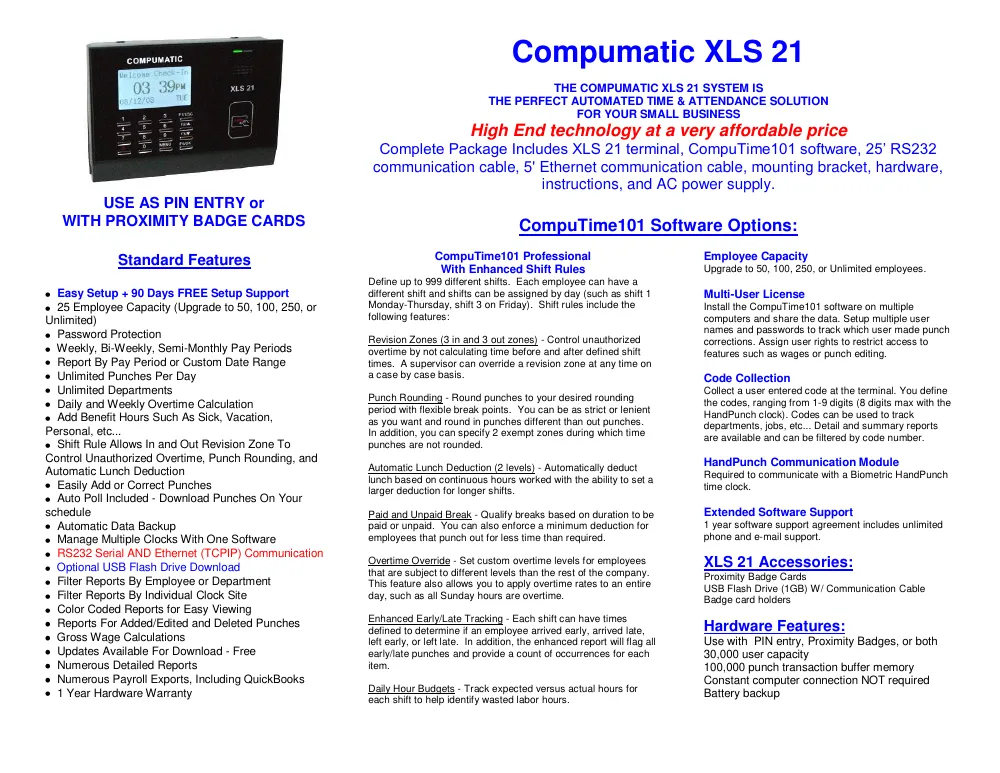
The text of page 1, from the PDF itself
Compumatic XLS 21 THE COMPUMATIC XLS 21 SYSTEM IS THE PERFECT AUTOMATED TIME & ATTENDANCE SOLUTION FOR YOUR SMALL BUSINESS
High End technology at a very affordable price Complete Package Includes XLS 21 terminal, CompuTime101 software, 25’ RS232 communication cable, 5' Ethernet communication cable, mounting bracket, hardware, instructions, and AC power supply. USE AS PIN ENTRY or WITH PROXIMITY BADGE CARDS Standard Features Easy Setup + 90 Days FREE Setup Support 25 Employee Capacity (Upgrade to 50, 100, 250, or Unlimited) Password Protection Weekly, Bi-Weekly, Semi-Monthly Pay Periods Report By Pay Period or Custom Date Range Unlimited Punches Per Day Unlimited Departments Daily and Weekly Overtime Calculation Add Benefit Hours Such As Sick, Vacation, Personal, etc... Shift Rule Allows In and Out Revision Zone To Control Unauthorized Overtime, Punch Rounding, and Automatic Lunch Deduction Easily Add or Correct Punches Auto Poll Included - Download Punches On Your schedule Automatic Data Backup Manage Multiple Clocks With One Software RS232 Serial AND Ethernet (TCPIP) Communication Optional USB Flash Drive Download Filter Reports By Employee or Department Filter Reports By Individual Clock Site Color Coded Reports for Easy Viewing Reports For Added/Edited and Deleted Punches Gross Wage Calculations Updates Available For Download - Free Numerous Detailed Reports Numerous Payroll Exports, Including QuickBooks 1 Year Hardware Warranty
CompuTime101 Software Options: CompuTime101 Professional With Enhanced Shift Rules Define up to 999 different shifts. Each employee can have a different shift and shifts can be assigned by day (such as shift 1 Monday-Thursday, shift 3 on Friday). Shift rules include the following features: Revision Zones (3 in and 3 out zones) - Control unauthorized overtime by not calculating time before and after defined shift times. A supervisor can override a revision zone at any time on a case by case basis. Punch Rounding - Round punches to your desired rounding period with flexible break points. You can be as strict or lenient as you want and round in punches different than out punches. In addition, you can specify 2 exempt zones during which time punches are not rounded. Automatic Lunch Deduction (2 levels) - Automatically deduct lunch based on continuous hours worked with the ability to set a larger deduction for longer shifts.
Employee Capacity Upgrade to 50, 100, 250, or Unlimited employees.
Multi-User License Install the CompuTime101 software on multiple computers and share the data. Setup multiple user names and passwords to track which user made punch corrections. Assign user rights to restrict access to features such as wages or punch editing.
Code Collection Collect a user entered code at the terminal. You define the codes, ranging from 1-9 digits (8 digits max with the HandPunch clock). Codes can be used to track departments, jobs, etc... Detail and summary reports are available and can be filtered by code number.
HandPunch Communication Module Required to communicate with a Biometric HandPunch time clock.
Paid and Unpaid Break - Qualify breaks based on duration to be paid or unpaid. You can also enforce a minimum deduction for employees that punch out for less time than required.
Extended Software Support
Overtime Override - Set custom overtime levels for employees that are subject to different levels than the rest of the company. This feature also allows you to apply overtime rates to an entire day, such as all Sunday hours are overtime.
- XLS 21 Accessories
- Enhanced Early/Late Tracking - Each shift can have times defined to determine if an employee arrived early, arrived late, left early, or left late. In addition, the enhanced report will flag all early/late punches and provide a count of occurrences for each item. Daily Hour Budgets - Track expected versus actual hours for each shift to help identify wasted labor hours.
1 year software support agreement includes unlimited phone and e-mail support.
Proximity Badge Cards USB Flash Drive (1GB) W/ Communication Cable Badge card holders
Hardware Features: Use with PIN entry, Proximity Badges, or both 30,000 user capacity 100,000 punch transaction buffer memory Constant computer connection NOT required Battery backup