Manual · Cisco
Appendix B, Connectors and Cables (Catalyst 2900 Series XL Installation Guide)
Manual6 pagesPDF 72 KB
Connectors and cables appendix for the Catalyst 2900 Series XL switches: 10/100 and 100BaseFX ports, cable pinouts and console port wiring.
Covers · 1 model
The models it covers
Summary
What is in it
Appendix B of the Catalyst 2900 Series XL Installation Guide, describing the cables, connectors and adapters that connect to the switch ports. It covers the RJ-45 10/100 ports and when to use straight-through or crossover cables, the 100BaseFX duplex SC fiber ports, straight-through and crossover cable schematics, identifying a rollover cable, and connecting the console port to a PC or terminal, with pinout tables for the DB-9 and DB-25 adapters.
Its parts
- 10/100 Ports
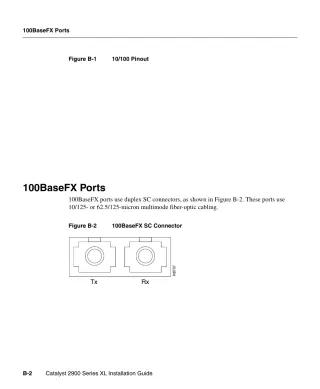
- 100BaseFX Ports
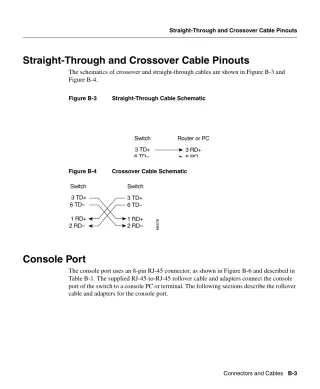
- Straight-Through and Crossover Cable Pinouts
- Console Port
From the manual · read page by page
Key facts from this manual
Each line names its page in the PDF.
Appendix B, Connectors and Cables, from the Catalyst 2900 Series XL Installation Guide. It describes the 10/100 RJ-45 ports, the 100BaseFX fiber ports and the RJ-45 console port, with cable schematics and console pinouts. It shows which cable to use for each connection and how to connect a PC or terminal to the console port.
- 10/100 ports
- Standard RJ-45 connectors with internal crossover, marked with an X in the port name p. 1
- Copper cabling
- Straight-through cable to servers and workstations; crossover cable to other switches or repeaters p. 1
- 100BaseFX ports
- Duplex SC connectors; 10/125- or 62.5/125-micron multimode fiber, as printed p. 2
- Console port
- 8-pin RJ-45 connector, wired as DTE p. 3, 5
- Console cable to a PC
- RJ-45-to-RJ-45 rollover cable and RJ-45-to-DB-9 female DTE adapter, both provided p. 5
- Console cable to a terminal
- RJ-45-to-RJ-45 rollover cable and RJ-45-to-DB-25 female DTE adapter p. 6
What this manual walks you through
- Choosing a straight-through or crossover cable for the 10/100 ports p. 1, 3
- Connecting the 100BaseFX fiber ports p. 2
- Identifying a rollover cable p. 4
- Connecting the console port to a PC p. 5
- Connecting the console port to a terminal p. 6
Good to know
- Two ports that are both marked with an X need a crossover cable; if only one is, use a straight-through cable. p. 1
- Expansion module cables and connectors are described in the separate modules and ATM modules installation guides. p. 1
Questions this manual answers
What cable connects a Catalyst 2900 XL to another switch?
A crossover cable; servers and workstations take a straight-through cable. p. 1
How do I connect a PC to the Catalyst 2900 XL console port?
Use the supplied RJ-45-to-RJ-45 rollover cable with the RJ-45-to-DB-9 female DTE adapter, and run terminal-emulation software on the PC. p. 5
What connector do the Catalyst 2900 XL 100BaseFX ports use?
Duplex SC connectors, for multimode fiber-optic cable. p. 2
How can I tell a rollover cable from a straight cable?
Hold both ends side by side with the tab at the back: pin 1 on one plug and pin 8 on the other should be the same wire color. p. 4
The whole text · 1 part
Read the manual here as text
Its text as extracted from the PDF, unedited, in parts; each page opens the PDF at that page.
The file