Spec sheet · Cisco
Ordering Guide: Cisco Aironet 1200 Series Access Point
Spec sheet6 pagesPDF 163 KB
Ordering guide for the Cisco Aironet 1200 Series access point: platform, 802.11b and 802.11a radio modules, power, antennas and bundles.
Names · 1 model
The models it names
Filed with · 3 models
Also filed with these models on the old site
Summary
What is in it
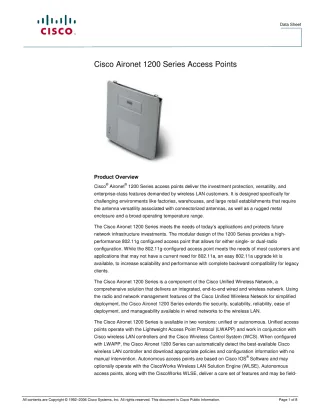
Cisco's ordering guide for the Aironet 1200 Series Access Point. It explains the two ways to order (configurable components or pre-configured bundles), then lists part numbers for the AIR-AP1200 platform, regulatory domain options, the 802.11b mini-PCI and 802.11a CardBus radio modules, power supplies and power injectors, antennas, the console configuration cable, compatible client adapters, and the pre-configured AP1220B and AP1220A bundles.
Its parts
- Cisco Aironet 1200 Series Access Point Platform
- Regulatory Domain Options
- 802.11b Radio Module
- 802.11a Radio Module
- Power Supplies
- Antennas
- Console Configuration Cable
- Client Adapters
- Pre-configured Cisco Aironet 1200 Series 802.11b Bundle
From the sheet · read page by page
Key facts from this sheet
Each line names its page in the PDF.
Cisco ordering guide from 2002 for the Aironet 1200 Series Access Point, covering the AIR-AP1200 platform and the AIR-AP1220B and AIR-AP1220A pre-configured bundles. It lists the part numbers of radio modules, power options, the console cable and compatible client adapters, and explains which pieces must be ordered together. It does not name the AP1230B, AP1231 or AP1232.
- Platform
- AIR-AP1200 access point platform with an 802.11b mini-PCI slot and an 802.11a CardBus slot p. 1
- Connectors
- Ethernet uplink; dual RP-TNC antenna connectors p. 1, 5
- 802.11b bundle
- AIR-AP1220B-X*-K9: AIR-MP20B-X*-K9 802.11b radio installed in the mini-PCI slot (X* = regulatory domain) p. 5
- 802.11a bundle
- AIR-AP1220A-X*-K9: AIR-RM20A-X*-K9 802.11a radio module installed in the CardBus slot (X* = regulatory domain) p. 5
- Bundle SKUs
- AIR-AP1220B-A-K9 (FCC), AIR-AP1220B-E-K9 (ETSI), AIR-AP1220B-J-K9 (Telec), AIR-AP1220A-A-K9 (FCC), AIR-AP1220A-J-K9 (Telec) p. 5
- Power over Ethernet
- 802.11a and dual-radio setups need the power injector; 802.11b-only setups may use Cisco line power-enabled switches and patch panels p. 2
- 802.11b radio modules
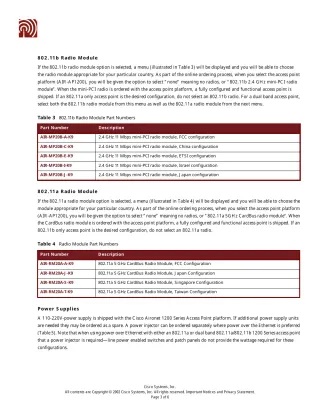
- 2.4 GHz 11 Mbps mini-PCI: AIR-MP20B-A-K9 (FCC), AIR-MP20B-C-K9 (China), AIR-MP20B-E-K9 (ETSI), AIR-MP20B-I-K9 (Israel), AIR-MP20B-J-K9 (Japan) p. 3
- 802.11a radio modules
- 5 GHz CardBus: AIR-RM20A-A-K9 (FCC), AIR-RM20A-J-K9 (Japan), AIR-RM20A-S-K9 (Singapore), AIR-RM20A-T-K9 (Taiwan) p. 3
- Power options
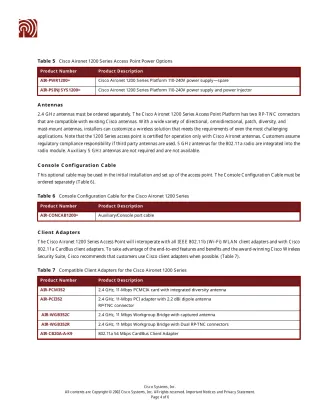
- AIR-PWR1200= spare power supply; AIR-PSINJSYS1200= power supply and power injector p. 4
- Console cable
- AIR-CONCAB1200= auxiliary/console port cable, ordered separately p. 4
- Antennas
- 2.4 GHz antennas sold separately; the 5 GHz antenna is built into the 802.11a radio module p. 4
- Client adapters
- AIR-PCM352 PCMCIA card, AIR-PCI352 PCI adapter, AIR-WGB352C and AIR-WGB352R workgroup bridges, AIR-CB20A-A-K9 802.11a CardBus adapter p. 4
- Regulatory domains
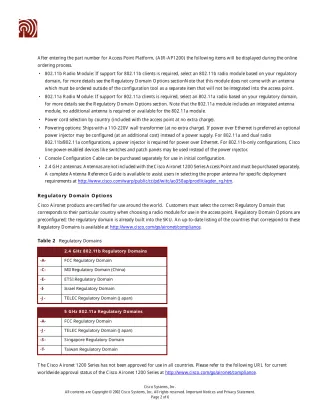
- Built into the SKU. 802.11b: A FCC, C China, E ETSI, I Israel, J Japan. 802.11a: A FCC, J Japan, S Singapore, T Taiwan p. 2
What this sheet walks you through
- Choosing between configurable ordering and pre-configured bundles p. 1
- Picking radio modules for a single-band or dual-band access point p. 3
- Choosing the regulatory domain for the country of use p. 2
- Choosing between the wall power supply and a power injector p. 2
- Selecting 2.4 GHz antennas p. 2
Good to know
- Line power-enabled switches and patch panels do not supply enough wattage for 802.11a or dual-band units; use the power injector. p. 3
- The access point is certified only with Cisco Aironet antennas. p. 4
- The 1200 Series is not approved for use in all countries. p. 2
- The 802.11b radio module does not come with an antenna. p. 2
Questions this sheet answers
What radio is in the Cisco Aironet AP1220B?
The AIR-AP1220B bundle has the AIR-MP20B 802.11b radio installed in the mini-PCI slot. p. 5
Does the Aironet 1200 access point come with antennas?
No. 2.4 GHz antennas are bought separately; the 802.11a module has its antenna built in. p. 2
What is the console cable part number for the Aironet 1200?
AIR-CONCAB1200=, an auxiliary/console port cable ordered separately. p. 4
Can a PoE switch power an Aironet 1200 with an 802.11a radio?
No. 802.11a and dual-radio units need the power injector for power over Ethernet. p. 2
Contents
Chapters and sections
Each line opens the PDF at its page.
The whole text · 1 part
Read the sheet here as text
Its text as extracted from the PDF, unedited, in parts; each page opens the PDF at that page.
The file