Manual · CipherLab
CipherLab 8100 Series Users Guide
Manual11 pagesPDF 493 KB
Users guide for the CipherLab 8100 Series RF data terminals, including the 8150 2.4GHz model with laser or CCD scanner.
Covers · 1 model
The models it covers
Summary
What is in it
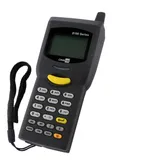
Syntech (CipherLab) users guide for the 8100 Series RF data terminals, the 8110 (433MHz) and 8150 (2.4GHz) models with laser or long range CCD scanners. It lists electrical, environmental, physical, CPU, memory, scanner, display, keypad and communication specifications, RF configuration settings, the kernel, system and application software modules, keypad operation, the system and kernel modes, and basic troubleshooting.
Its parts
- Introduction
- General Features and Characteristics
- RF Configuration
- Software Organization
- Operations
- Troubleshooting
From the manual · read page by page
Key facts from this manual
Each line names its page in the PDF.
This is the 2002 users guide for the CipherLab 8100 Series RF data terminals, covering the 8110 (433MHz) and 8150 (2.4GHz) models with laser or CCD scanners. It gives the specifications, RF settings, keypad use, system and kernel mode menus, and troubleshooting.
- Device
- Compact handheld RF data terminal with built-in laser or CCD barcode scanner p. 3
- Radio
- 8150: 2.4GHz RF, 19200bps, coverage over 1000m line-of-sight, 100mW p. 4, 5, 6
- Batteries
- Two AAA disposable or rechargeable batteries, or a rechargeable Ni-MH pack; 3.0V, 7.0mAh lithium backup battery p. 3, 4
- Working time
- 8150: 8 hours p. 4
- Memory
- 1 M Bytes flash program memory; 256 K Bytes SRAM data memory p. 4
- Display
- 128x64 graphic dots FSTN LCD with LED back-light p. 5
- Scanner options
- 8150L: visible laser, 36±3 scans per second, depth of field 5 ~ 95 cm; 8150C: CCD, 30 scans/sec, depth of field 15cm p. 4
- Keypad
- 21 rubber keys: alphanumeric, arrow, function and scan trigger keys p. 5
- RS-232
- Up to 115200bps, used for program download p. 5, 10
- Accessories
- RS-232 cable, cradle, battery charger, RF base station p. 5
- Environment
- Operating -20 to 60 °C; storage -30 to 70 °C; 1.2m drop onto concrete p. 4
- Size and weight
- 145mm (L) x 63mm (W) x 33.5mm (H); 200g including batteries p. 4
- Programming
- "C", "BASIC" and a Windows-based Application Generator p. 5
What this manual walks you through
- Using the keypad, alpha input and FN key combinations p. 8
- Setting the RF channel, ID, output power and time-outs p. 6, 9
- System mode settings such as clock, backlight, CPU speed and auto power-off p. 8, 9
- Testing memory, scanner, buzzer, display and keys p. 9, 10
- Downloading a user program over RS-232 p. 10
- Kernel mode and updating the kernel p. 10
- How the kernel, system and application software modules fit together p. 7
- Troubleshooting power, download, keypad and scanning problems p. 11
Good to know
- Initializing or testing the data memory erases its contents. p. 9
- After a kernel update, do not power off until the terminal restarts by itself. p. 10
- Symbologies beyond the default set must be enabled through programming. p. 10
- The application program can overwrite the RF settings made in system mode. p. 9
- The Test & Calibrate function in kernel mode is for manufacture only. p. 10
Questions this manual answers
What is the range of the CipherLab 8150?
The 8150 uses 2.4GHz RF at 19200bps with coverage over 1000m line-of-sight. p. 5
What batteries does the CipherLab 8150 use and how long do they last?
Two AAA batteries or a rechargeable Ni-MH pack. The 8150 runs about 8 hours. p. 3, 4
How do I enter system mode on a CipherLab 8100 series terminal?
Press the 7, 9 and POWER keys at the same time. p. 8
Why can't I download a program to the CipherLab 8150?
Check that the RS-232 cable is plugged in tightly and that the host COM port, baud rate, data bits, parity and stop bit match the terminal. p. 11
The whole text · 2 parts
Read the manual here as text
Its text as extracted from the PDF, unedited, in parts; each page opens the PDF at that page.
The file