Manual · Brady
BRADYMARKER XC Plus Printer
Manual23 pagesPDF 843 KB
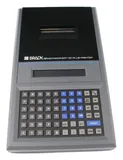
User manual for the Bradymarker XC Plus portable wire marker and label printer, including the PermaSleeve (PS) version.
Covers · 1 model
The models it covers
Summary
What is in it
The user manual for the Bradymarker XC Plus (BMXC+), a portable dot matrix printer for wire markers, electronic component labels and general identification labels. It introduces the features, explains the menu, formats, type sizes, stored legend lists and keyboard, lists marker size codes, and covers the ribbon, battery pack, a tutorial on loading labels and printing, cleaning and maintenance, troubleshooting, and the Bradymarker PS version that prints PermaSleeve wire marking sleeves.
Its parts
- Introduction
- Basic Operations
- Tutorial
- Cleaning and maintenance
- Troubleshooting
- Operational exercise
From the manual · read page by page
Key facts from this manual
Some pages are scans or cannot be read; this says only what the readable text supports. Each line names its page in the PDF.
Brady's user manual for the BRADYMARKER XC Plus (BMXC+), a portable dot matrix printer for wire markers and labels, including the BMXC+-PS version that also prints PermaSleeve sleeves. It explains the menus and keys, loading labels and ribbons, printing, serializing and saving legend lists, cleaning, battery replacement and the error messages.
- Device
- Nine-pin dot matrix portable printer for wire markers, electronic component labels and general identification labels p. 3
- Printing
- Eight lines per inch, 23 characters per line; three text sizes and three formats p. 3
- Display
- Two-line, 24-character liquid crystal display p. 3
- Memory
- 8K standard, expandable to 32K; up to 26 legend lists and 6500 characters in 8k p. 3, 5
- Power
- Battery or AC; charger is a UL listed 120V, 60Hz input / 12VAC, 2A output adapter p. 3
- Battery life
- 500 labels per charge; charge 16 hours before use p. 3, 7
- Battery pack
- Battery pack assembly part # 29415 p. 18
- Text sizes
- Normal 12 cpi, Small 16 cpi, Large 8 cpi p. 5
- Formats
- Wiremarker, component and strip p. 5
- Marker sizes
- Widths .17 to 1.50 inches, size codes x01 to x17 p. 8
- PS ribbon
- BMXC+-PS: R5200 ribbon p. 7
- Cleaning kit
- Brady printer cleaning kit PCK-1 p. 16
- Backup battery
- Lithium battery on the circuit board keeps stored legend lists when the pack is drained p. 18
- Ribbon life
- 3 to 6 months at normal usage p. 22
What this manual walks you through
- Charging the battery pack and installing the ribbon p. 13
- Setting size code, format, type size, quantity and justification, then printing p. 13
- Serializing labels with the Serial key p. 13
- Saving, adding to, editing and erasing legend lists p. 13, 14
- Converting the PS model for PermaSleeve sleeves and setting the print head gap p. 9, 10
- Loading PermaSleeve wire marker sleeves p. 10, 11
- Cleaning the platen, ribbon guides and print head p. 16
- Lubricating the printer mechanism p. 17
- Replacing the battery pack p. 18
- Removing a stuck label and reinstalling the material chute p. 20
Good to know
- Never pull a label or sleeve out of the rear of the printer; the drive is one-way only. p. 11
- The print head shaft takes #1 grease only; oil damages it. p. 17
- Remove the ribbon before cleaning the print head. p. 16
- The black platen tape cannot be replaced with electrical tape. p. 18
- The optic sensor is factory set and needs no adjustment. p. 18
Questions this manual answers
What does "Please Verify Size" mean on a Bradymarker XC Plus?
A wrong material size code or format was entered, or the optic scanner is dirty or out of its housing. p. 22
How many labels does the BMXC+ print on one charge?
About 500 labels; the manual says to charge the pack 16 hours before use. p. 3, 7
What is the part number of the Bradymarker XC Plus battery pack?
The replacement battery pack assembly is part # 29415. p. 18
How do I clean the print head on the BMXC+?
Remove the ribbon, hold the H key while turning the printer on, and follow the screen prompts with a cleaning strip. p. 16
The whole text · 3 parts
Read the manual here as text
Its text as extracted from the PDF, unedited, in parts; each page opens the PDF at that page.
The file