Manual · Axiohm
A758 USB Thermal Receipt and Impact Slip Printer: Owner's Guide
Manual235 pagesPDF 3.8 MB
Owner's guide for the A758 USB thermal receipt and impact slip printer: setup, USB drivers, use, troubleshooting, specs and commands.
Covers · 1 model
The models it covers
Summary
What is in it
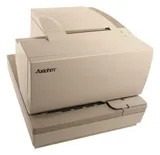
The owner's guide for the A758 point-of-sale printer, which combines a thermal receipt printer on top with an impact slip printer in front for forms and checks. It covers features and options (MICR, check flip), setup and USB driver installation, loading paper and ribbon, printer controls, configuration and diagnostics, troubleshooting, media and supplies, technical specifications, the RS-232C, parallel and USB interfaces, and a full programming guide to the command set.
Its parts
- About the Printer
- Setup Guide
- Using the Printer
- Printer Media & Supplies
- Technical Specifications
- Communication Interface
- Programming Guide
From the manual
Key facts from this manual
Each line names its page in the PDF.
Owner's guide for the A758, a point-of-sale printer that combines a thermal receipt printer and an impact slip printer for forms and checks. It covers setup over USB, RS-232C or parallel, using and configuring the printer, troubleshooting, paper, ribbons, cables and power supplies with their part numbers, the technical specifications and the full command set.
- What it is
- Two printers in one: a thermal receipt printer on top and an impact slip printer in front for forms and checks p. 10
- Interfaces
- RS-232C or USB; IEEE 1284 parallel as an option p. 12
- Power
- 24VDC ±10% from a standard 55W or optional 75W remote supply, into a 3-pin female Mini-DIN p. 89
- Power supply part numbers
- A758-K330 (55 watt) and A758-K331 (75 watt), each with attached cable to printer and U.S. power cord p. 66
- Receipt printing
- 44 or 56 columns on 80 mm thermal paper, 8 dots/mm, up to 130 mm/second, optional cutter p. 13
- Slip printing
- Forms up to five plies, 290 lines per minute, 66 standard or 80 compressed columns p. 13
- Memory
- 512K flash with 192K free for logos, graphics and user data; 1 MB or 2 MB flash also available p. 12
- Receipt paper
- Direct thermal, 80 mm wide, roll up to 90 mm diameter, 51 to 86 µm (2.0 to 3.4 mil) thick p. 78
- Paper part numbers
- A152-0034 standard density and A152-0035 light density, 50 rolls of 90mm diameter p. 65
- Ribbon cassettes
- A152-0004 purple and A152-0005 black (3 million characters); A152-0011 purple and A152-0012 black long life (5 million characters); 12 per order p. 68
- Communication cables
- RS-232C 25-pin male (printer) to 9-pin female (host): A141-0005 (2 meters), A141-0006 (6 meters); IEEE-1284 parallel 25-pin: A141-0009 (3 meters) p. 67
- Cash drawer port
- 6-contact RJ11 jack, up to two drawers; 24V ±10%, 2.0 Amps maximum, pulse 50 to 310 msec p. 89
- Dimensions
- 178 mm (7.0 in.) high, 229 mm (9.0 in.) wide, 264 mm (10.4 in.) deep; 347 mm (13.7 in.) deep with extended slip table p. 101
- Weight
- 4.3 kg (9.4 lbs.) non-MICR; 4.9 kg (10.8 lbs.) with MICR and Check Flip p. 101
What this manual walks you through
- Features and options of the thermal receipt and impact slip stations p. 12, 13
- What a blinking On-Line, Paper Status or Error LED means and what to do p. 54
- Thermal paper sizes, approved paper grades and roll part numbers p. 65
- Ordering cash drawers, power supplies, power cords and adapters p. 66
- Communication cables and form and check size limits for the slip station p. 67
- Ordering ribbon cassettes, extended slip tables and documentation p. 68
- Certifications, temperature and humidity limits, and slip and receipt media limits p. 77, 78
- Power draw per print station and the electrical interfaces p. 89
Good to know
- The printer does not operate while any cover is open. p. 54
- Paper outside the approved grades can contaminate the print head and cause light or missing print. p. 65
- Forms with holes along the top or right edge should not be used in the slip station. p. 67
- When a host terminal powers the printer, it must provide a time delay fuse on the 24V input. p. 89
- A shielded interface cable is required, with the shield grounded at each end. p. 3
Questions this manual answers
What power supply does the A758 printer use?
It runs on 24VDC ±10% from a 55W supply as standard or a 75W supply as an option; the supplies with U.S. cord are A758-K330 (55 watt) and A758-K331 (75 watt). p. 66, 89
What paper rolls fit the A758 receipt printer?
Direct thermal paper 80 mm wide, on rolls up to 90 mm in diameter, 51 to 86 µm thick. p. 78
Which ribbon cassette does the A758 slip printer take?
A152-0005 (black) or A152-0004 (purple) for 3 million characters, or the long life A152-0012 (black) and A152-0011 (purple) for 5 million. p. 68
Can the A758 work with A756 software?
Yes. Set to A756 emulation mode in the Configuration Menu, it is backward compatible with A756 slip and receipt applications without journal. p. 78
Why is the error LED blinking on my A758?
Receipt paper is out or low, a cover is open, the knife, slip or carriage is jammed, a check jammed during flip, or the supply voltage is out of range. p. 54
The whole text · 24 parts
Read the manual here as text
Its text as extracted from the PDF, unedited, in parts; each page opens the PDF at that page.
- Pages 1 to 101-10
- Pages 11 to 2011-20
- Pages 21 to 3021-30
- Pages 31 to 4031-40
- Pages 41 to 5041-50
- Pages 51 to 6051-60
- Pages 61 to 7061-70
- Pages 71 to 8071-80
- Pages 81 to 9081-90
- Pages 91 to 10091-100
- Pages 101 to 110101-110
- Pages 111 to 120111-120
- Pages 121 to 130121-130
- Pages 131 to 140131-140
- Pages 141 to 150141-150
- Pages 151 to 160151-160
- Pages 161 to 170161-170
- Pages 171 to 180171-180
- Pages 181 to 190181-190
- Pages 191 to 200191-200
- Pages 201 to 210201-210
- Pages 211 to 220211-220
- Pages 221 to 230221-230
- Pages 231 to 235231-235
The file