



Spec sheet · Allot
Allot WiseWan 200 Spec Sheet
Spec sheet4 pagesPDF 535 KB
All 4 pages are below, each with its text.
Filed with · 1 model
Also filed with these models on the old site
From the sheet · read page by page
Key facts from this sheet
Each line names its page in the PDF.
Product sheet for the Allot NetReality WAN bandwidth management and monitoring devices, run from the WanXplorer console and server. Its ordering table lists the NetReality WW-100, WW-201, WW-230, WW-401, WW-402, WW-601 and WW-1001; the sheet never prints the WiseWan 200 designation the site files it under. It gives the interfaces, power, size, QoS and monitoring features and the WanXplorer system requirements.
- Device
- NetReality WAN bandwidth management and QoS device with traffic monitoring, managed by WanXplorer p. 2
- Interfaces
- Serial V.35, X.21, X.24, RS-232, RS-449, EIA-530 (up to 12 Mbps); CSU T1/E1; Ethernet RJ-45 10/100 Mbps; HSSI SCSI 2 (up to 52 Mbps) p. 4
- Power
- 85 to 265 VAC, 47 to 63 Hz, internal supply p. 4
- Size and weight
- 1.75 in. (44.45 mm) high, 17.52 in. (445 mm) wide, 14.57 in. (370 mm) deep; 15.4 lbs. (7.0 Kg) p. 4
- WW-201
- Part No. K50201: 2 Mbps, 1 line, serial or CSU/DSU or Ethernet p. 4
- WW-230
- Part No. K50230: 2 Mbps, 1 line, channelized T1 or E1 p. 4
- Model range
- WW-100 (512 Kbps), WW-201 and WW-230 (2 Mbps), WW-401 and WW-402 (12 Mbps), WW-601 (52 Mbps), WW-1001 (100 Mbps) p. 4
- Configuration
- By serial port or from the central WanXplorer p. 4
- Fail-safe
- Automatic hardware bypass (in WiseCable) p. 4
- Link layer
- Frame Relay, HDLC, PPP, Bay PPP, Timeplex p. 4
- QoS enforcement
- Min/max bandwidth per PVC (DLCI) or line, six priority levels, DiffServ and DE bit marking p. 4
- Monitoring
- Real-time reports at 60-second granularity, plus historical, daily/weekly analysis and SLA reports p. 4
- WanXplorer console
- Sun/Solaris 2.6 or later or Windows 95/98/NT/2000/XP; MS Internet Explorer 5.5, 6.0; 64MB RAM p. 4
- WanXplorer server
- Sun/Solaris 2.5, 2.51 or 2.7 or Windows NT or 2000; 256MB RAM and 2GB disk minimum; CD-ROM p. 4
What this sheet walks you through
- Autodiscovering WAN connections and PVCs p. 2
- Monitoring WAN traffic and congested circuits p. 2
- Defining QoS policies with bandwidth limits and priorities p. 2
- Alerts for SLA breaches and link failures p. 3
- Verifying a provider's service level agreement against CIR p. 3
- Monitoring and prioritizing voice traffic with the WanTel add-on p. 3
- WAN accounting with the WanAccountant add-on p. 3
Good to know
- Accounting needs the optional WanAccountant, and voice support needs the optional WanTel. p. 4
- The hardware bypass is listed as provided in the WiseCable. p. 4
Questions this sheet answers
What WAN interfaces does the Allot NetReality support?
Serial (V.35, X.21, X.24, RS-232, RS-449, EIA-530, up to 12 Mbps), CSU for T1/E1, Ethernet RJ-45 at 10/100 Mbps, and HSSI up to 52 Mbps. p. 4
Which NetReality models handle 2 Mbps?
The WW-201 (Part No. K50201, serial, CSU/DSU or Ethernet) and the WW-230 (K50230, channelized T1 or E1), each with one line. p. 4
What power does the NetReality need?
85 to 265 VAC at 47 to 63 Hz, through an internal supply. p. 4
What computer does the WanXplorer console need?
Sun/Solaris 2.6 or later, or Windows 95/98/NT/2000/XP, with MS Internet Explorer 5.5 or 6.0 and 64MB RAM. p. 4
The file
Size and text
Every page · 4
Read it here
Each page as it is printed, and its words beside it, so a phone can search and copy them.
Page1of 4
Open in the PDF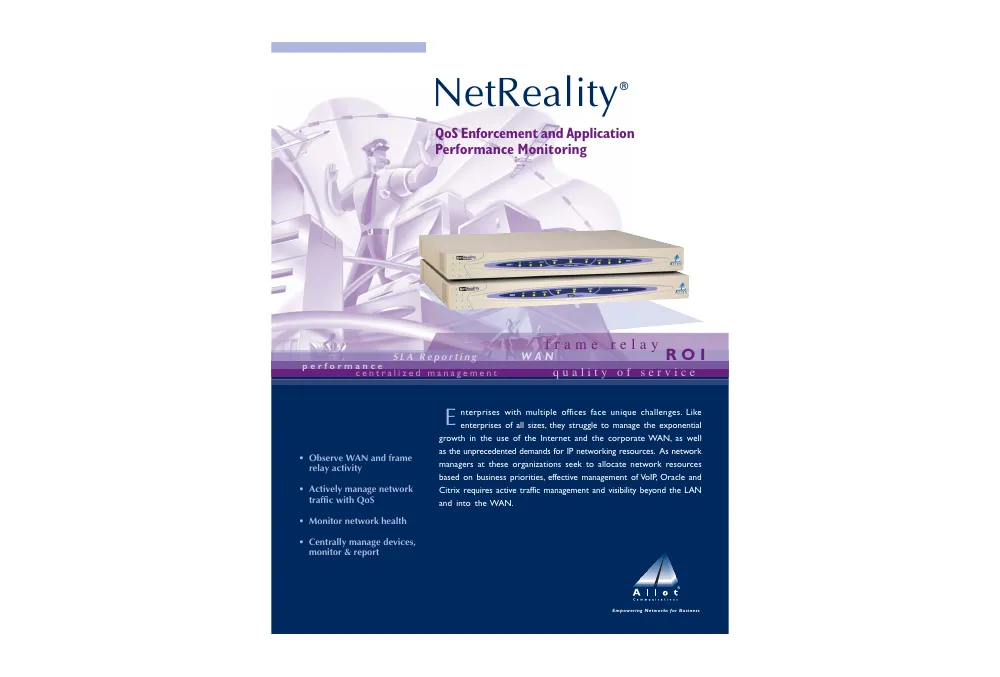
The text of page 1, from the PDF itself
NetReality
QoS Enforcement and Application Performance Monitoring
SLA Reporting performance
centralized managementframe relayWANROIquality of serviceE
- Observe WAN and frame relay activity
- Actively manage network traffic with QoS
nterprises with multiple offices face unique challenges. Like enterprises of all sizes, they struggle to manage the exponential growth in the use of the Internet and the corporate WAN, as well as the unprecedented demands for IP networking resources. As network managers at these organizations seek to allocate network resources based on business priorities, effective management of VoIP, Oracle and Citrix requires active traffic management and visibility beyond the LAN and into the WAN.
- Monitor network health
- Centrally manage devices, monitor & report
Empowering Networks for Business
Page2of 4
Open in the PDF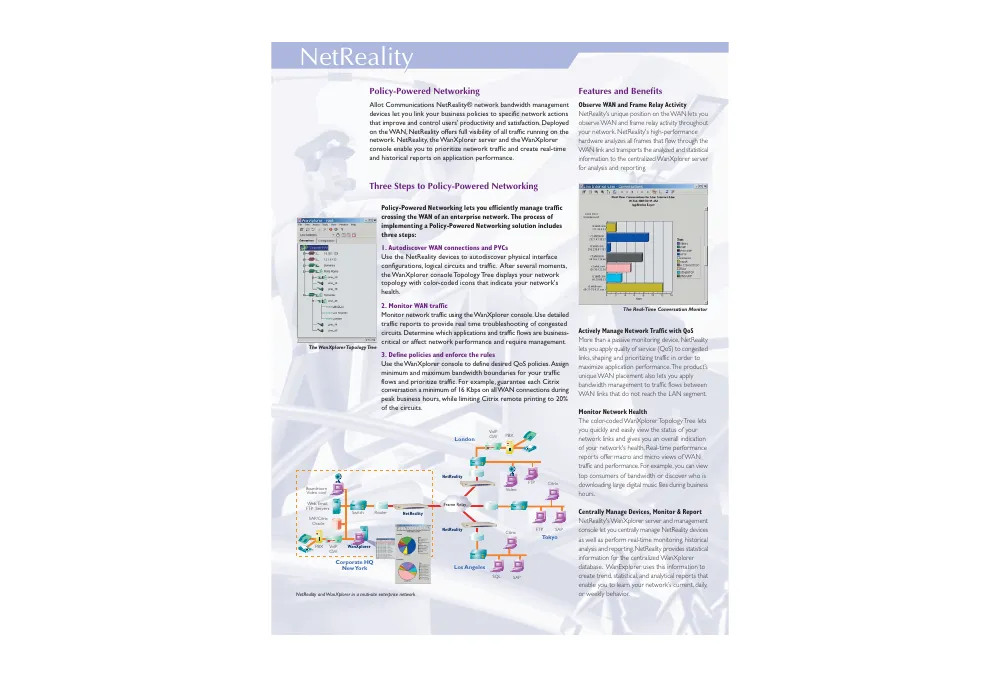
The text of page 2, from the PDF itself
NetReality Policy-Powered Networking
Features and Benefits
Allot Communications NetReality® network bandwidth management devices let you link your business policies to specific network actions that improve and control users' productivity and satisfaction. Deployed on the WAN, NetReality offers full visibility of all traffic running on the network. NetReality, the WanXplorer server and the WanXplorer console enable you to prioritize network traffic and create real-time and historical reports on application performance.
Observe WAN and Frame Relay Activity NetReality's unique position on the WAN lets you observe WAN and frame relay activity throughout your network. NetReality's high-performance hardware analyzes all frames that flow through the WAN link and transports the analyzed and statistical information to the centralized WanXplorer server for analysis and reporting.
Three Steps to Policy-Powered Networking Policy-Powered Networking lets you efficiently manage traffic crossing the WAN of an enterprise network. The process of implementing a Policy-Powered Networking solution includes three steps: 1. Autodiscover WAN connections and PVCs Use the NetReality devices to autodiscover physical interface configurations, logical circuits and traffic. After several moments, the WanXplorer console Topology Tree displays your network topology with color-coded icons that indicate your network's health.
The WanXplorer Topology Tree
2. Monitor WAN traffic Monitor network traffic using the WanXplorer console. Use detailed traffic reports to provide real time troubleshooting of congested circuits. Determine which applications and traffic flows are businesscritical or affect network performance and require management. 3. Define policies and enforce the rules Use the WanXplorer console to define desired QoS policies. Assign minimum and maximum bandwidth boundaries for your traffic flows and prioritize traffic. For example, guarantee each Citrix conversation a minimum of 16 Kbps on all WAN connections during peak business hours, while limiting Citrix remote printing to 20% of the circuits.
LondonVoIP GWPBX
NetReality FTP Boardroom Video conf
Citrix
Video
Web, Email, FTP Servers
Actively Manage Network Traffic with QoS More than a passive monitoring device, NetReality lets you apply quality of service (QoS) to congested links, shaping and prioritizing traffic in order to maximize application performance. The product’s unique WAN placement also lets you apply bandwidth management to traffic flows between WAN links that do not reach the LAN segment. Monitor Network Health The color-coded WanXplorer Topology Tree lets you quickly and easily view the status of your network links and gives you an overall indication of your network's health. Real-time performance reports offer macro and micro views of WAN traffic and performance. For example, you can view top consumers of bandwidth or discover who is downloading large digital music files during business hours.
Frame Relay SwitchRouterNetReality
SAP/Citrix Oracle NetReality
CitrixFTPSAPTokyo PBX
The Real-Time Conversation Monitor
VoIP GWWanXplorerCorporate HQ New YorkLos Angeles SQL
NetReality and WanXplorer in a muti-site enterprise network
SAP
Centrally Manage Devices, Monitor & Report NetReality's WanXplorer server and management console let you centrally manage NetReality devices as well as perform real-time monitoring, historical analysis and reporting. NetReality provides statistical information for the centralized WanXplorer database. WanExplorer uses this information to create trend, statistical, and analytical reports that enable you to learn your network’s current, daily, or weekly behavior.
Page3of 4
Open in the PDF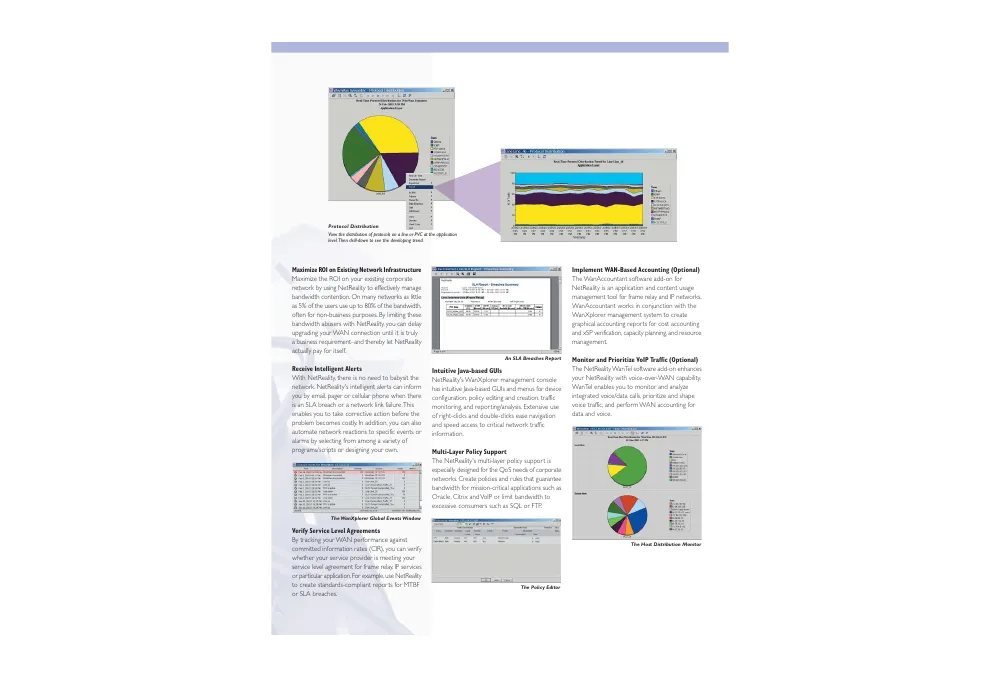
The text of page 3, from the PDF itself
Protocol Distribution View the distribution of protocols on a line or PVC at the application level.Then drill-down to see the developing trend.
Implement WAN-Based Accounting (Optional) The WanAccountant software add-on for NetReality is an application and content usage management tool for frame relay and IP networks. WanAccountant works in conjunction with the WanXplorer management system to create graphical accounting reports for cost accounting and xSP verification, capacity planning, and resource management.
Maximize ROI on Existing Network Infrastructure Maximize the ROI on your existing corporate network by using NetReality to effectively manage bandwidth contention. On many networks as little as 5% of the users use up to 80% of the bandwidth, often for non-business purposes. By limiting these bandwidth abusers with NetReality, you can delay upgrading your WAN connection until it is truly a business requirement–and thereby let NetReality actually pay for itself. An SLA Breaches Report
Receive Intelligent Alerts With NetReality, there is no need to babysit the network. NetReality's intelligent alerts can inform you by email, pager or cellular phone when there is an SLA breach or a network link failure. This enables you to take corrective action before the problem becomes costly. In addition, you can also automate network reactions to specific events or alarms by selecting from among a variety of programs/scripts or designing your own.
Intuitive Java-based GUIs NetReality's WanXplorer management console has intuitive Java-based GUIs and menus for device configuration, policy editing and creation, traffic monitoring, and reporting/analysis. Extensive use of right-clicks and double-clicks ease navigation and speed access to critical network traffic information.
Monitor and Prioritize VoIP Traffic (Optional) The NetReality WanTel software add-on enhances your NetReality with voice-over-WAN capability. WanTel enables you to monitor and analyze integrated voice/data calls, prioritize and shape voice traffic, and perform WAN accounting for data and voice.
Multi-Layer Policy Support The NetReality's multi-layer policy support is especially designed for the QoS needs of corporate networks. Create policies and rules that guarantee bandwidth for mission-critical applications such as Oracle, Citrix and VoIP or limit bandwidth to excessive consumers such as SQL or FTP.
The WanXplorer Global Events Window
Verify Service Level Agreements By tracking your WAN performance against committed information rates (CIR), you can verify whether your service provider is meeting your service level agreement for frame relay, IP services or particular application. For example, use NetReality to create standards-compliant reports for MTBF or SLA breaches.
The Host Distribution Monitor
The Policy Editor
Page4of 4
Open in the PDF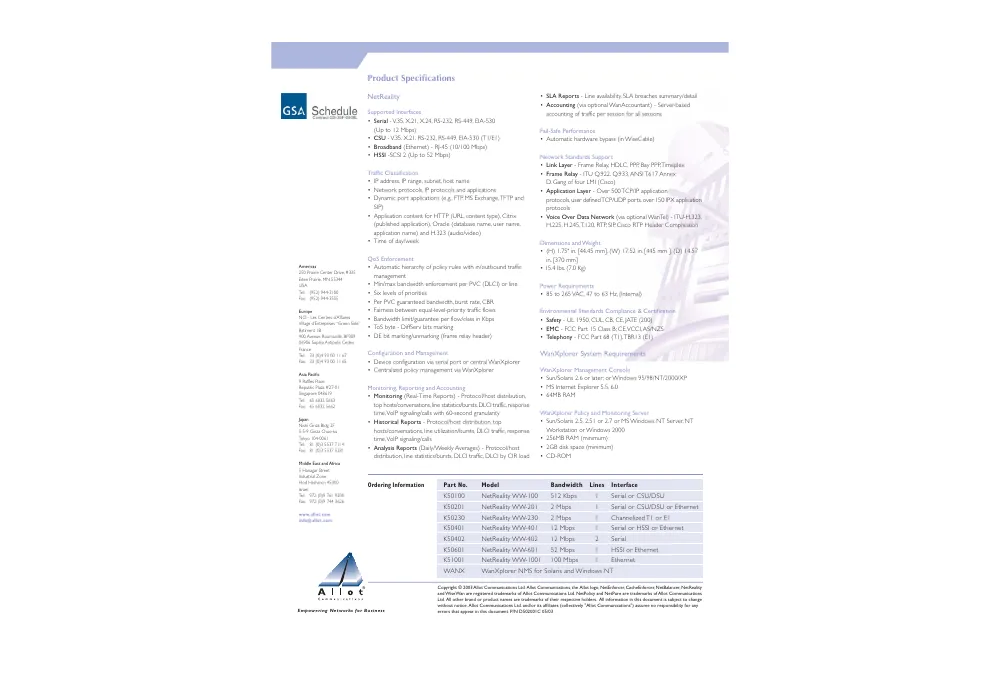
The text of page 4, from the PDF itself
Product Specifications NetReality Supported Interfaces
- Serial - V.35, X.21, X.24, RS-232, RS-449, EIA-530 (Up to 12 Mbps)
- CSU - V.35, X.21, RS-232, RS-449, EIA-530 (T1/E1)
- Broadband (Ethernet) - RJ-45 (10/100 Mbps)
- HSSI -SCSI 2 (Up to 52 Mbps) Traffic Classification
- IP address, IP range, subnet, host name
- Network protocols, IP protocols and applications
- Dynamic port applications (e.g., FTP, MS Exchange, TFTP and SIP)
- Application content for HTTP (URL, content type), Citrix (published application), Oracle (database name, user name, application name) and H.323 (audio/video)
- Time of day/week QoS Enforcement
- Automatic hierarchy of policy rules with in/outbound traffic management
- Min/max bandwidth enforcement per PVC (DLCI) or line
- Six levels of priorities
- Per PVC guaranteed bandwidth, burst rate, CBR
- Fairness between equal-level-priority traffic flows
- Bandwidth limit/guarantee per flow/class in Kbps
- ToS byte - DiffServ bits marking
- DE bit marking/unmarking (frame relay header)
Americas 250 Prairie Center Drive, #335 Eden Prairie, MN 55344 USA Tel: (952) 944-3100 Fax: (952) 944-3555 Europe NCI - Les Centres d’Affaires Village d’Entreprises “Green Side” Batiment 1B 400 Avenue Roumanille, BP309 06906 Sophia Antipolis Cedex France Tel: 33 (0)4 93 00 11 67 Fax: 33 (0)4 93 00 11 65
Configuration and Management
- Device configuration via serial port or central WanXplorer
- Centralized policy management via WanXplorer
Asia Pacific 9 Raffles Place Republic Plaza #27-01 Singapore 048619 Tel: 65 6832 5663 Fax: 65 6832 5662
Monitoring, Reporting and Accounting
- Monitoring (Real-Time Reports) - Protocol/host distribution, top hosts/conversations, line statistics/bursts, DLCI traffic, response time, VoIP signaling/calls with 60-second granularity
- Historical Reports - Protocol/host distribution, top hosts/conversations, line utilization/bursts, DLCI traffic, response time, VoIP signaling/calls
- Analysis Reports (Daily/Weekly Averages) - Protocol/host distribution, line statistics/bursts, DLCI traffic, DLCI by CIR load
Japan Nishi Ginza Bldg. 2F 5-5-9 Ginza Chuo-ku Tokyo 104-0061 Tel: 81 (0)3 5537 7114 Fax: 81 (0)3 5537 5281 Middle East and Africa 5 Hanagar Street Industrial Zone Hod Hasharon 45800 Israel Tel: 972 (0)9 761 9200 Fax: 972 (0)9 744 3626
Ordering Information
www.allot.com info@allot.com
Empowering Networks for Business
- SLA Reports - Line availability, SLA breaches summary/detail
- Accounting (via optional WanAccountant) - Server-based accounting of traffic per session for all sessions Fail-Safe Performance
- Automatic hardware bypass (in WiseCable) Network Standards Support
- Link Layer - Frame Relay, HDLC, PPP, Bay PPP, Timeplex
- Frame Relay - ITU Q.922, Q.933, ANSI T.617 Annex D, Gang of four LMI (Cisco)
- Application Layer - Over 500 TCP/IP application protocols, user defined TCP/UDP ports, over 150 IPX application protocols
- Voice Over Data Network (via optional WanTel) - ITU-H.323, H.225, H.245, T.120, RTP, SIP, Cisco RTP Header Compression Dimensions and Weight
- (H) 1.75" in. [44.45 mm], (W) 17.52 in. [445 mm ], (D) 14.57 in. [370 mm]
- 15.4 lbs. (7.0 Kg) Power Requirements
- 85 to 265 VAC, 47 to 63 Hz, (Internal) Environmental Standards Compliance & Certification
- Safety - UL 1950, CUL, CB, CE, JATE (200)
- EMC - FCC Part 15 Class B; CE, VCCI, AS/NZS
- Telephony - FCC Part 68 (T1), TBR13 (E1)
WanXplorer System Requirements WanXplorer Management Console
- Sun/Solaris 2.6 or later; or Windows 95/98/NT/2000/XP
- MS Internet Explorer 5.5, 6.0
- 64MB RAM WanXplorer Policy and Monitoring Server
- Sun/Solaris 2.5, 2.51 or 2.7 or MS Windows NT Server, NT Workstation or Windows 2000
- 256MB RAM (minimum)
- 2GB disk space (minimum)
- CD-ROM
Part No.ModelBandwidthLinesK50100NetReality WW-100512 Kbps1Serial or CSU/DSUInterfaceK50201NetReality WW-2012 Mbps1
Serial or CSU/DSU or Ethernet
K50230NetReality WW-2302 Mbps1Channelized T1 or E1K50401NetReality WW-40112 Mbps1
Serial or HSSI or Ethernet
K50402NetReality WW-40212 Mbps2SerialK50601NetReality WW-60152 Mbps1HSSI or EthernetK51001NetReality WW-1001100 Mbps1EthernetWANX
WanXplorer NMS for Solaris and Windows NT
Copyright © 2003 Allot Communications Ltd. Allot Communications, the Allot logo, NetEnforcer, CacheEnforcer, NetBalancer, NetReality and WiseWan are registered trademarks of Allot Communications Ltd. NetPolicy and NetPure are trademarks of Allot Communications Ltd. All other brand or product names are trademarks of their respective holders. All information in this document is subject to change without notice. Allot Communications Ltd. and/or its affiliates (collectively "Allot Communications") assume no responsibility for any errors that appear in this document. P/N D502001C 05/03