Manual · Allen-Bradley
Application Note: AdaptaScan Reader to a PLC-5 Using DH-485 Protocol with the 2760-RB Module and the 2760-SFC2 Protocol Cartridge
Manual12 pagesPDF 151 KB
Allen-Bradley application note: connecting AdaptaScan bar code readers to a PLC-5 over DH-485 with a 2760-RB module and 2760-SFC2 cartridge.
What this file really is
The old site listed this file as a manual for the Allen-Bradley 2760-SFC2. Linked as a manual, this is a 12-page application note on connecting AdaptaScan readers to a PLC-5 with the 2760-RB and 2760-SFC2, not the 2760-SFC2 Protocol Cartridge Manual (2760-2.19).
Filed under · 1 model
Filed under these models in the old catalog
Summary
What is in it
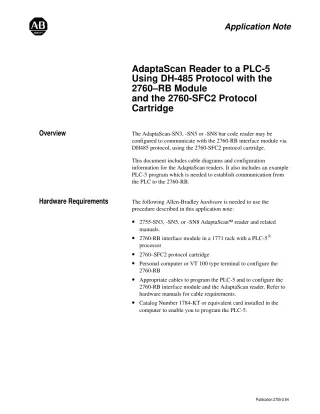
Allen-Bradley application note showing how to connect a 2755-SN3, -SN5 or -SN8 AdaptaScan bar code reader to a PLC-5 over DH-485, using the 2760-RB flexible interface module with the 2760-SFC2 protocol cartridge. It lists the hardware and software needed, PLC-5 compatibility, DIP switch settings, 2760-RB configuration menu entries, AdaptaScan reader settings, a sample PLC-5 block transfer program, a note for New Generation PLC-5 processors, and cable wiring.
Its parts
- Overview
- Hardware Requirements
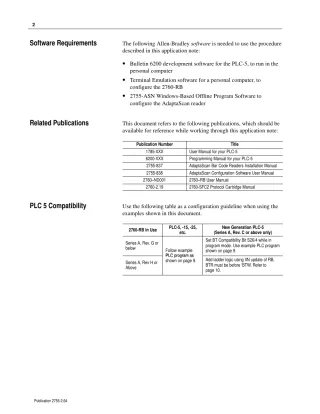
- Software Requirements
- Related Publications
- PLC 5 Compatibility
- Configuration
- Sample PLC Program
From the manual · read page by page
Key facts from this manual
Each line names its page in the PDF.
An Allen-Bradley application note on connecting a 2755-SN3, -SN5 or -SN8 AdaptaScan bar code reader to a PLC-5 over DH-485, through a 2760-RB interface module fitted with the 2760-SFC2 protocol cartridge. It lists the hardware and software needed and gives DIP switch and 2760-RB configuration settings, reader setup screens, sample ladder logic and cable wiring.
- Device
- Protocol cartridge for the 2760-RB interface module that lets an AdaptaScan reader communicate by DH485 protocol p. 1
- Readers
- 2755-SN3, -SN5 or -SN8 AdaptaScan bar code readers p. 1
- Port protocol name
- Port 1 set to 2760-SFC2 LAN SERIES A REVISION B p. 5
- DH-485 settings
- 19,200 bits per second; slot time 15, inter-char time 7, idle time 3, retries 3; BCD node numbers and byte swapping enabled p. 5
- Configuration terminal
- Terminal emulator at 9600 baud, 8 data bits, 1 stop bit, no parity, no flow control, sending a break sequence p. 5
- Module placement
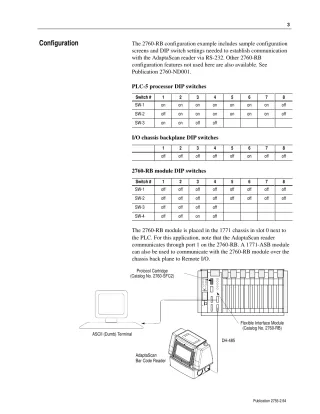
- 2760-RB in slot 0 of the 1771 chassis next to the PLC; the reader uses port 1 of the 2760-RB p. 3
- Software needed
- Bulletin 6200 PLC-5 development software; terminal emulation software; 2755-ASN Windows-Based Offline Program Software p. 2
- Programming card
- Catalog Number 1784-KT or equivalent card in the computer to program the PLC-5 p. 1
- Message framing
- Reader and 2760-RB use Carriage Return, Line Feed trailers; the 2760-RB then block-transfer-reads the bar code data into the PLC p. 4
- Reader cable
- 2760-RB Port 1 (25-pin D male) to the AdaptaScan RS-485 terminal strip: A to TxA, B to TxB, GND 7 to GND p. 11
- Terminal cable
- 2760-RB config port (25-pin D male) to dumb terminal (25-pin D female): Tx 2 to 3 Rx, Rx 3 to 2 Tx, GND 7 to 7 GND p. 11
- New Generation PLC5
- 2760-RB Revision H or above: add an Immediate Input (IIN) on the BRR bit just before the BTR rung; BTR must come before BTW p. 10
- Related manuals
- 2760-SFC2 Protocol Cartridge Manual 2760-2.19; 2760-RB User Manual 2760-ND001; AdaptaScan installation manual 2755-837 p. 2
What this manual walks you through
- Hardware and software needed for the link p. 1, 2
- Setting PLC-5, chassis backplane and 2760-RB DIP switches p. 3
- Configuring the 2760-RB from a terminal for the 2760-SFC2 cartridge p. 5
- Setting the AdaptaScan serial port and messages in the offline software p. 6, 7, 8
- Sample PLC-5 ladder program with block transfer read and write p. 9
- Using a Revision H or later 2760-RB with New Generation PLC5 processors p. 10
- Building the terminal and reader cables p. 11
Good to know
- The reader settings shown are only part of the configuration a given application needs. p. 6
- With a Revision H or later 2760-RB and New Generation PLC5 processors in a local rack, the PLC may not see the BRR bit. p. 10
- BTR must come before BTW. p. 10
- The 2760-RB configuration screens should be entered exactly as shown, then saved. p. 4
Questions this manual answers
What is the Allen-Bradley 2760-SFC2?
A protocol cartridge for the 2760-RB interface module that lets an AdaptaScan reader talk to it by DH485 protocol. p. 1
Which bar code readers work with the 2760-SFC2 in this setup?
The 2755-SN3, -SN5 or -SN8 AdaptaScan readers. p. 1
What baud rate does the 2760-SFC2 DH-485 link use?
The configuration example sets 19,200 bits per second. p. 5
How do I get into the 2760-RB configuration menu?
Set all module DIP switches off, connect the smart cable, and send a break sequence from a terminal emulator at 9600 baud, 8 data bits, 1 stop bit, no parity. p. 5
How is the AdaptaScan reader wired to the 2760-RB?
Port 1 of the 2760-RB (25-pin D male) goes to the reader's RS-485 terminal strip: A to TxA, B to TxB, GND 7 to GND. p. 11
Contents
Chapters and sections
Each line opens the PDF at its page.
The whole text · 2 parts
Read the manual here as text
Its text as extracted from the PDF, unedited, in parts; each page opens the PDF at that page.
The file