Manual · Allen-Bradley
Hand-Held Undecoded Bar Code Scanner User Manual (Cat. No. 2755-HUG-4, 2755-HUG-9)
Manual42 pagesPDF 324 KB
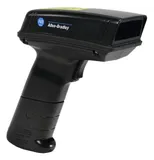
User manual for the Allen-Bradley 2755-HUG-4 standard range and 2755-HUG-9 extended range hand-held undecoded laser bar code scanners.
Covers · 1 model
The models it covers
Summary
What is in it
Allen-Bradley's user manual for the hand-held undecoded laser bar code scanners, the standard range 2755-HUG-4 and the extended range 2755-HUG-9. It describes the scanner features, LED indicators, safety labels, read ranges by symbol density and accessories, then how to connect the scanner to a compatible decoder and operate it. It also covers troubleshooting, cleaning the scan window, specifications, connector pinouts, EU compliance and bar code test symbols.
Its parts
- Using this Manual
- Scanner Features
- Connecting and Operating Scanner
- Troubleshooting and Maintenance
From the manual
Key facts from this manual
Each line names its page in the PDF.
Allen-Bradley user manual for the hand-held undecoded bar code scanners 2755-HUG-4 (standard range) and 2755-HUG-9 (extended range). It covers the scanner features, read ranges and accessories, how to connect the scanner to an Allen-Bradley decoder, troubleshooting, specifications and the connector pinout.
- Device
- Hand-held undecoded laser bar code scanner that needs a separate decoder p. 1, 5, 9
- Compatible decoders
- Bulletin 2708-DH5 Attended Workstations; Multi-Purpose Bar Code WorkStation 2755-DH1; Single or Dual-Head Enhanced Bar Code Decoder 2755-DD1x, -DS1x p. 16
- Power
- 4.8 to 14.0V DC; 110 mA at 5V DC typical p. 27
- Scan rate
- 33 to 39 scans/second p. 27
- Size and weight
- 5.0 (L) x 2.8 (W) x 6.3 (H) in, 127 x 71 x 160 mm; 8.5 oz (240 g) p. 27
- Operating temperature
- -22 to 122 F (-30 to 50 C); humidity 5% to 95% noncondensing p. 28
- Scanner cables
- 2755-HUC-GA1-08 (8 ft), 2755-HUC-GA1-15 (15 ft), 2755-HUC-GA1-20 (20 ft) p. 15
- Stands and boot
- Adjustable stands 2755-HFN-K1 (5 to 18 inch) and 2755-HFN-K2 (9 to 16 inch); multi-mount stand 2755-HFN-K3; protective boot 2755-HFN-H1 p. 15
- Gun adapter
- 2755-NC16 Series B, required for the Single or Dual-Head Enhanced Bar Code Decoder 2755-DS1A, -DD1A p. 18
- Trigger
- 2755-HUG-9: two-position trigger, first detent gives a spotter beam, second gives a scan line p. 9
- LEDs
- Green LED for good read, red LED while the laser is on p. 10
- Drop and storage
- Drop test 6 ft (1.8 meter) to concrete; storage -40 to 140 F (-40 to 60 C) p. 28
- Connector pins
- Pins 1 and 2 power, 3 ground, 4 enable, 5 start of scan, 6 trigger switch, 7 decode LED p. 29
- Print contrast
- 50% absolute dark/light differential minimum p. 27
What this manual walks you through
- Reading the read range charts by bar code density for both scanners p. 12, 13, 14
- Attaching and removing the scanner cable with its locking collar p. 17
- Connecting the scanner to a decoder, with the gun adapter where needed p. 18, 19
- Testing the scanner and scanning a label p. 20
- Using the spotter beam on the extended range scanner p. 21
- Scanning tips: angle and covering the whole symbol p. 22
- Troubleshooting no scan beam, a dot instead of a line, and symbols not read p. 24, 25
- Cleaning the scan window p. 26
- Scanner connector pinout p. 29
- Test bar code symbols for checking the system p. 41
Good to know
- Turn off power to the scanner and decoder before installing or removing scanner cables or connectors. p. 18
- Users upgrading from a 2755-G2 or -G3 scanner with the Series A gun adapter need the Series B adapter. p. 18
- No audible response is heard with the unattended decoders 2755-DS1x and -DD1x. p. 21
- Do not clean the window with abrasive materials or solvents such as alcohol or acetone; the scanner has no serviceable parts. p. 26
- The manual states the scanner is a CDRH Class II laser product; avoid staring into the beam. p. 11, 28
Questions this manual answers
What decoders work with the Allen-Bradley 2755-HUG-4 scanner?
Bulletin 2708-DH5 Attended Workstations, the 2755-DH1 Multi-Purpose Bar Code WorkStation, and the 2755-DD1x and -DS1x Single or Dual-Head Enhanced Decoders. p. 16
What power does the 2755-HUG-4 need?
4.8 to 14.0V DC, drawing 110 mA at 5V DC typical. p. 27
Do I need a gun adapter for the 2755-HUG-4?
Yes for the Single or Dual-Head Enhanced decoders (2755-DS1A, -DD1A), which need the 2755-NC16 Series B Gun Adapter; not for the 2708-DH5 or 2755-DH1. p. 18
Why does the 2755-HUG-9 show a dot instead of a scan line?
The trigger is not fully pressed: the first position gives the spotter beam, so press it to the next position to scan. p. 24
What cable lengths are there for the 2755-HUG-4?
8 ft (2755-HUC-GA1-08), 15 ft (2755-HUC-GA1-15) and 20 ft (2755-HUC-GA1-20). p. 15
Contents
Chapters and sections
Each line opens the PDF at its page.
- Front Cover1
- Important User Information2
- Preface - Using this Manual5
- 1 - Scanner Features8
- 2 - Connecting and Operating Scanner16
- 3 - Troubleshooting and Maintenance23
- A - Specifications27
- B - Scanner Pinout Connections29
- C - European Union Directive Compliance CE30
- Glossary32
- Index39
2 more lines, from page 41 on
The whole text · 8 parts
Read the manual here as text
Its text as extracted from the PDF, unedited, in parts; each page opens the PDF at that page.
The file